


What is the Orca Security plugin for ChatGPT and Codex?
The Orca Security plugin for ChatGPT and Codex connects both tools to Orca’s MCP server, giving security teams and developers access to their Orca data where they already work. ChatGPT and Codex can pull alerts, assets, attack paths, effective permissions, and code origins from your cloud environment, then use that context to answer security questions and write fixes.
Why AI assistants need cloud risk context
Most security questions still get answered the slow way. An engineer asks “are we exposed to this CVE?”, and someone on the security team logs into a console, builds a query, exports a CSV, and pastes the answer back into chat an hour later.
Meanwhile, security practitioners have transformed their workflows from AI prompting to building agents that automate repeatable work. Security teams draft reports and investigations in ChatGPT. Developers ship code with Codex. The coding agent is where the work happens, but it has no idea what is actually running in your cloud.
A general-purpose model can explain what a CVE is. It cannot tell you which of your thousands of assets carry it, which ones are internet-facing, or which one sits two hops from a production database.
Today, that changes. The Orca Security plugin is now available in the ChatGPT and Codex plugin directory, bringing Orca’s risk context into both products.
How the Orca plugin works: MCP server plus the Unified Data Model
The plugin connects ChatGPT and Codex to Orca’s MCP server. That server exposes Orca’s data as tools the model can call on its own: alerts, assets, attack paths, effective permissions, code origins, and Orca’s documentation.
The important part is what sits behind those tools. Every asset, alert, identity, and dependency is already correlated in Orca’s Unified Data Model before anyone types a prompt. So when ChatGPT answers, it is not reasoning over a raw list of findings. It is reasoning over findings that already carry reachability, blast radius, and business impact.
Big idea: The model brings the reasoning. Orca brings the context.
Tools the Orca MCP server exposes to ChatGPT and Codex include:
| Tool | What it returns |
|---|---|
| discovery_search | Results for a plain-language search across your environment, plus a link to see them in Orca |
| get_alert / get_alert_attack_path_data | Full alert details and the attack path behind it |
| get_asset_by_id / get_asset_by_name | Asset details and context |
| get_aws_effective_permissions_policy_on_asset | What an AWS identity can actually do, not just what its policy says |
| get_alerts_with_similar_malware / get_other_secret_occurrences | Whether one finding is part of a wider pattern |
| get_code_origin / get_terraform_chain | The repository and Terraform chain behind a cloud asset |
| update_alert_status | Moves an alert to open, in progress, or resolved |
| documentation_search | Answers from Orca’s product docs |
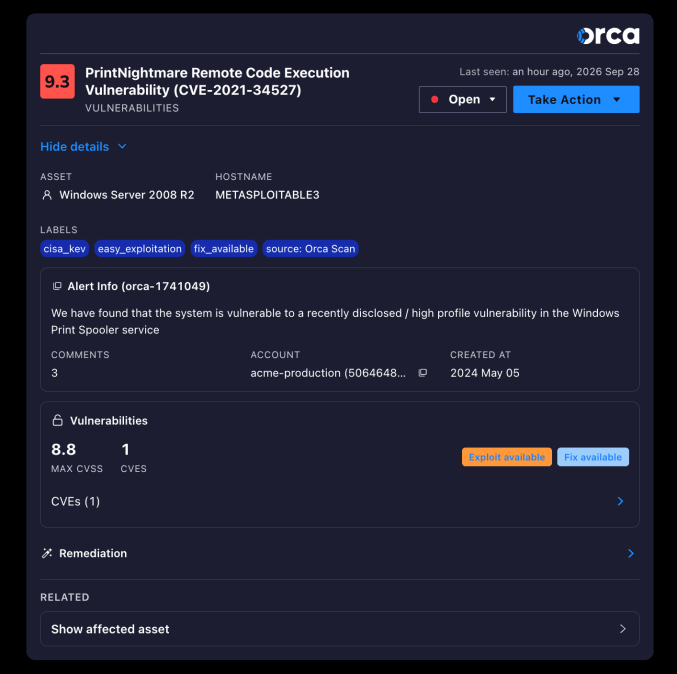
Some answers are too big for text. For alerts, ChatGPT renders an interactive Orca card instead of a paragraph, so you can read the risk and act on it without switching tabs.
Orca adds tools continuously, so treat this as a sample, not the full list. For teams that want repeatable workflows without writing prompts, Orca also maintains the AI Skills Hub, an open-source repo of agent skills such as orca-alert-triage that teams can fork and extend.
6 ways security teams use Orca in ChatGPT
The pattern is the same in every scenario below. You describe the goal, and ChatGPT decides which Orca tools to call, in what order, and how to stitch the results together. You do not need to know tool names or query syntax.
1. Find what is exposed right now
Scenario: A new security lead wants to know where the real risk sits on day one.
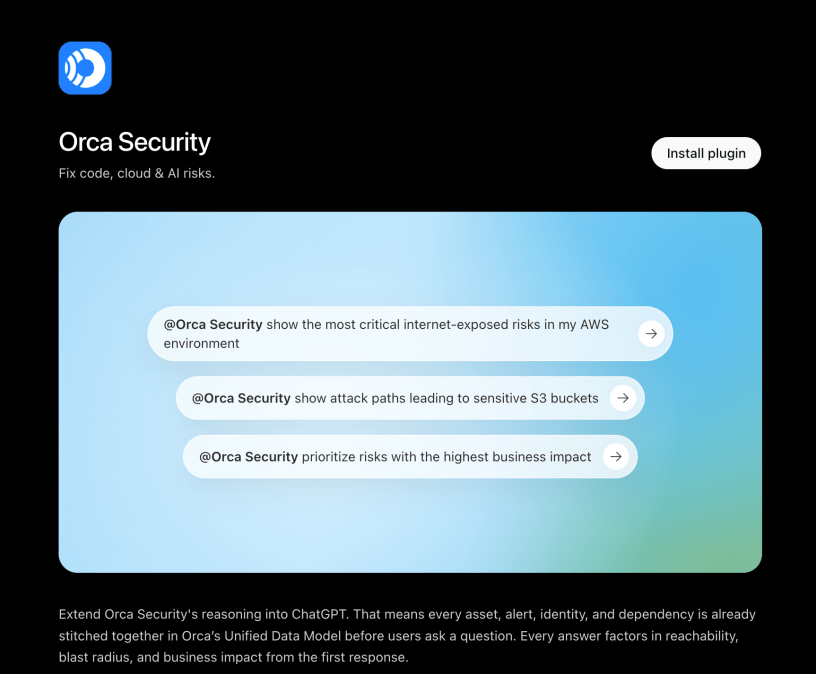
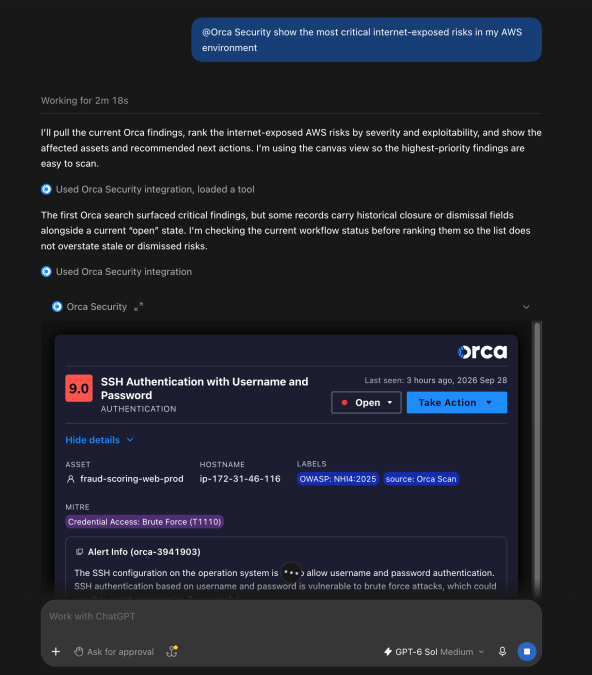
@Orca Security show the most critical internet-exposed risks in my AWS environment
ChatGPT runs a discovery search for internet-facing assets with critical findings, then ranks them by Orca’s risk score instead of raw CVSS. The answer ends with a link into the Orca app for anyone who wants to see the full result set.
2. Answer “are we affected?” before the Slack thread gets long
Scenario: A CVE is trending, and leadership wants an answer by noon.
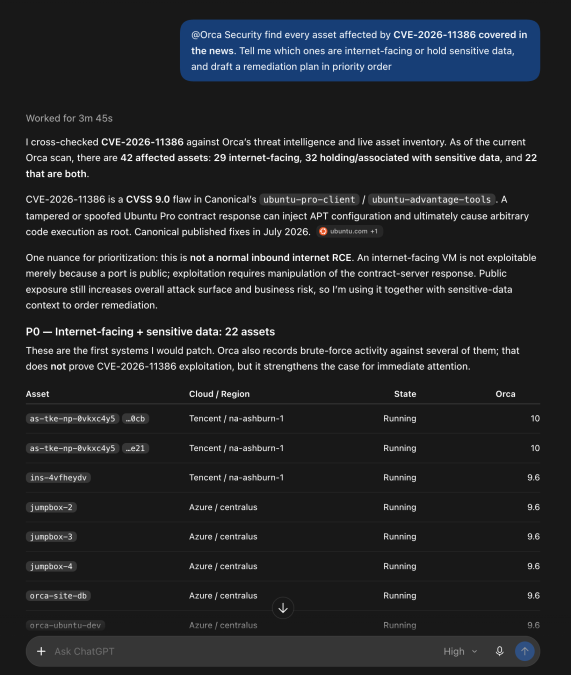
@Orca Security find every asset affected by CVE-2025-55182 covered in the news, tell me which ones are internet-facing or hold sensitive data, and draft a remediation plan in priority order
ChatGPT pulls the affected assets from Orca, separates the reachable ones from the ones that can wait, and pairs that list with what it knows about the fix. One prompt replaces a query, an export, and a spreadsheet.
3. Triage an alert from entry point to crown jewel
Scenario: An analyst picks up a critical alert and needs to know how bad it really is.
@Orca Security get alert orca-1234, walk me through its attack path hop by hop, and tell me the blast radius if it’s exploited
In ChatGPT, the alert doesn’t come back as a wall of text. It renders as an interactive Orca alert card right in the conversation, with the alert’s status.
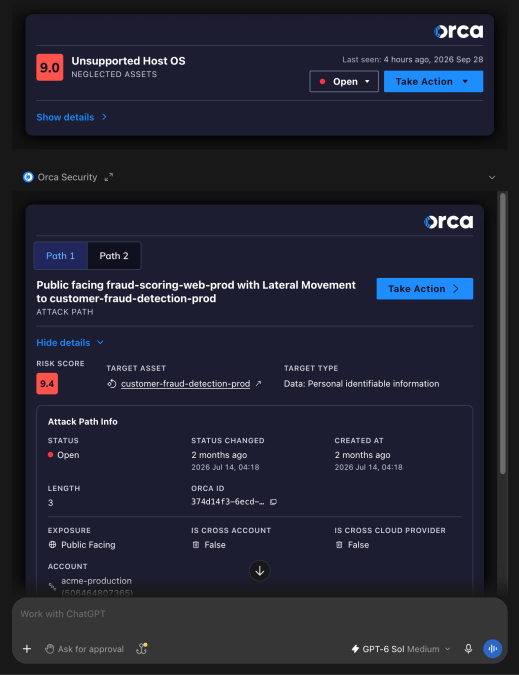
The card also surfaces the next step. Buttons for the attack path or the affected asset run the follow-up without another prompt, so the analyst goes from entry point to crown jewel to blast radius in a few clicks. The finding and the action on it live in the same place.
4. Check whether one finding is really many
Scenario: A malware alert or an exposed secret shows up on one machine. The real question is whether the same finding exists anywhere else.
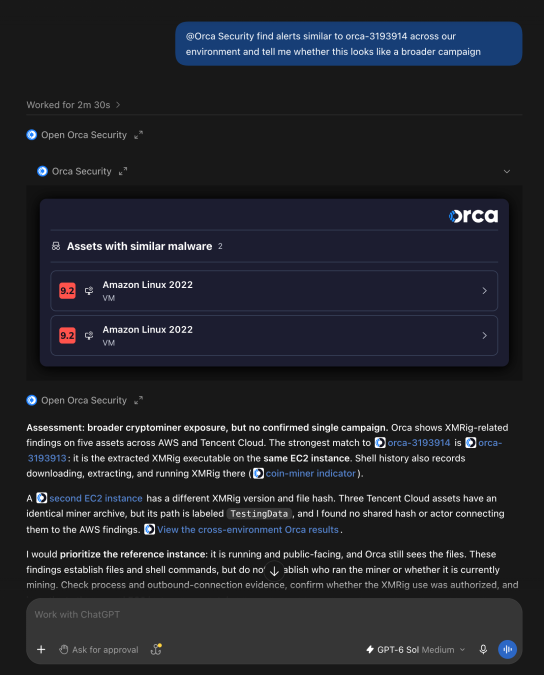
@Orca Security find alerts similar to orca-1234 across our environment and tell me whether this looks like a broader campaign
ChatGPT searches for alerts with the same malware or alert type, and for other places the same secret appears. It returns one answer: isolated incident, or pattern.
5. See what an identity can actually do
Scenario: A cloud engineer suspects a role is overprivileged but cannot untangle the policies by hand.
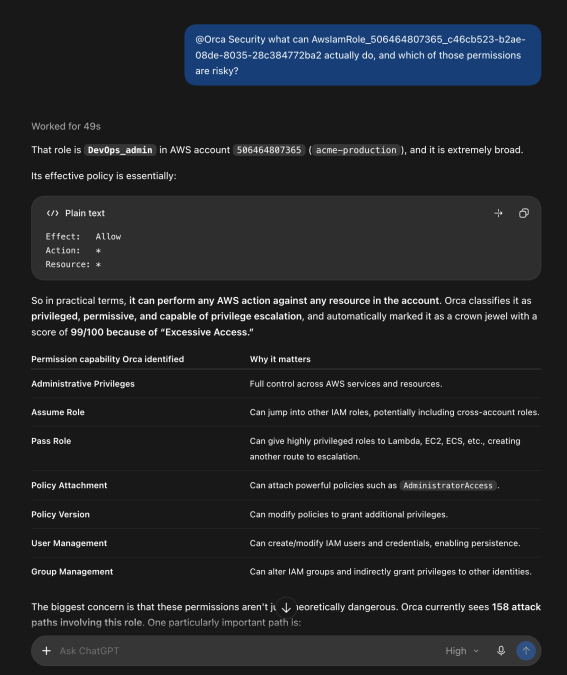
@Orca Security what can arn:aws:iam::123456789012:role/ExampleRole actually do, and which of those permissions are risky?
ChatGPT pulls the role’s effective permissions from Orca and explains them in plain language. The answer reflects what the role can really do, not just what one attached policy says.
6. Build the weekly readout in minutes
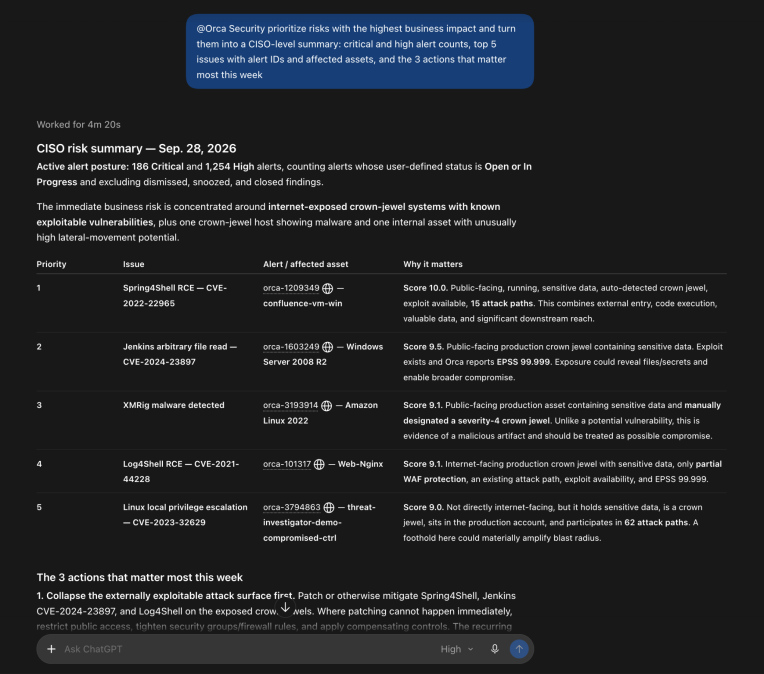
Scenario: The CISO wants a one-page posture summary every Monday.
@Orca Security prioritize risks with the highest business impact and turn them into a CISO-level summary: critical and high alert counts, top 5 issues with alert IDs and affected assets, and the 3 actions that matter most this week
ChatGPT does the discovery, then writes the summary in the format you asked for. The analyst reviews it instead of assembling it.
How developers use Orca in Codex to fix cloud risk at the source
Shifting left has always failed on the same point: context. Developers are asked to leave their editor, log into a security tool, learn its interface, and translate an abstract alert into a code change. Most of that time goes to translation, not fixing.
Codex removes the translation step. It can read your local files, and with the Orca plugin it can also read what Orca knows about the cloud those files deploy to. The alert and the code land in the same place. Security becomes part of the development environment instead of a gate at the end of it.
1. Fix a security ticket in one prompt
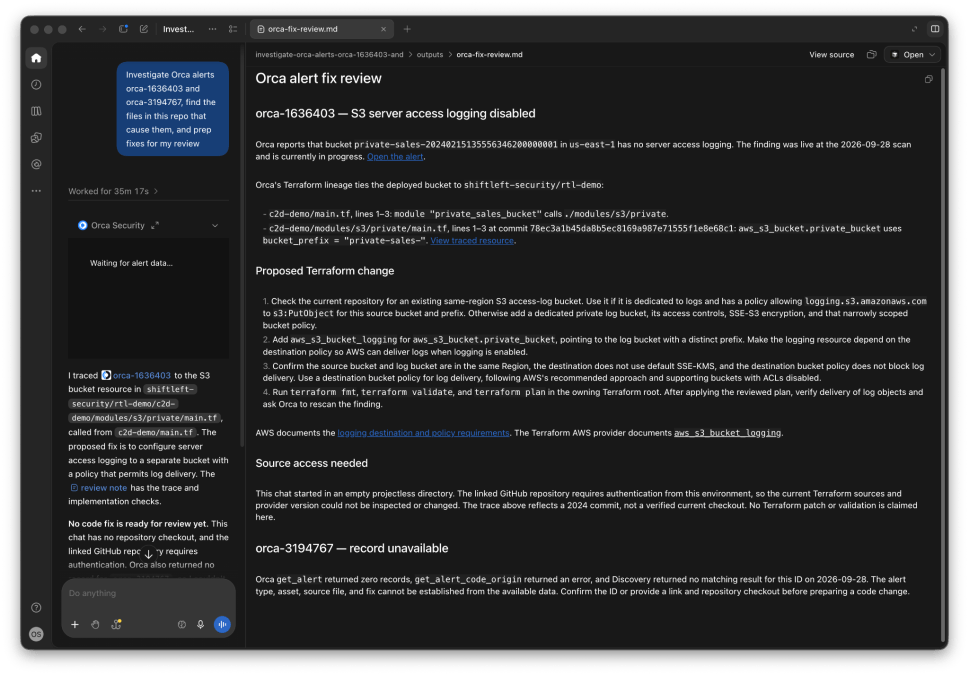
Scenario: A developer starts the day with two Orca alerts assigned to them.
Investigate Orca alerts orca-1636403 and orca-3194767, find the files in this repo that cause them, and prep fixes for my review
Codex pulls each alert from Orca, for example a missing S3 logging block and an outdated base image. It finds the matching Terraform file and Dockerfile, writes the fix, and hands back a diff. The developer reviews and approves instead of researching.
2. Burn down the IaC backlog
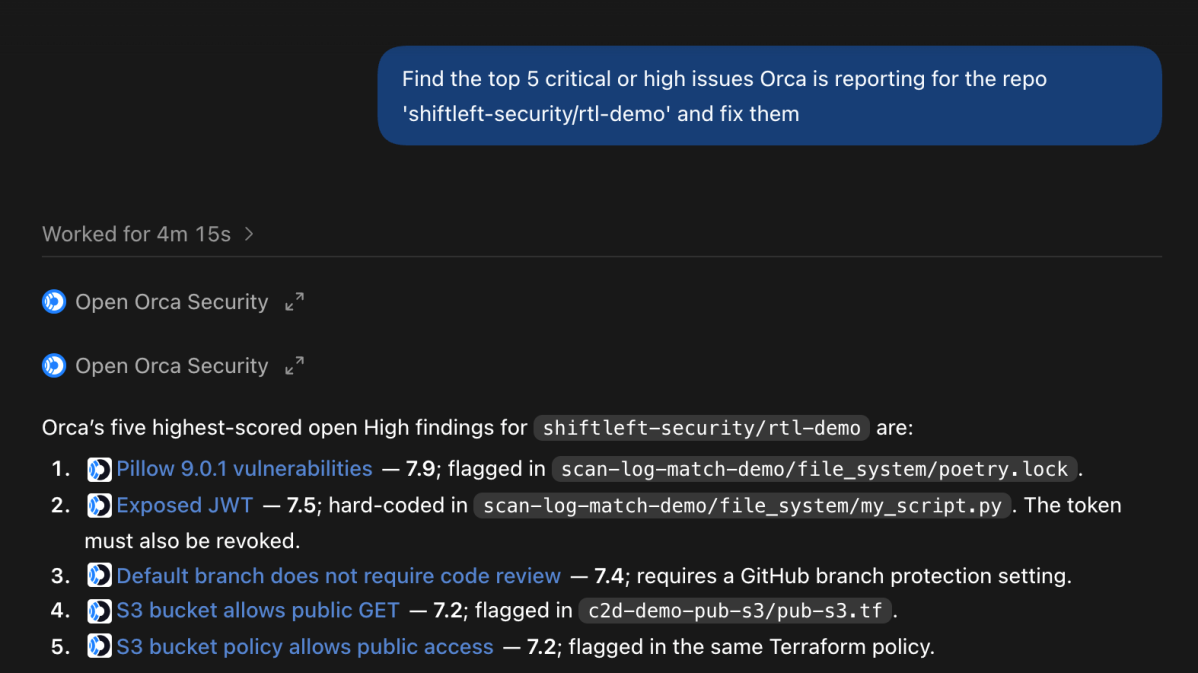
Scenario: A repository has accumulated high-severity findings that nobody has had time to touch.
Find the top 5 critical or high issues Orca is reporting for this repo and fix them
Codex queries Orca for open critical and high findings tied to the repo, such as a storage bucket without uniform access, a public dataset, or a hardcoded token. It edits the relevant files and summarizes each change so the pull request explains itself.
3. Trace a cloud risk back to the line of code
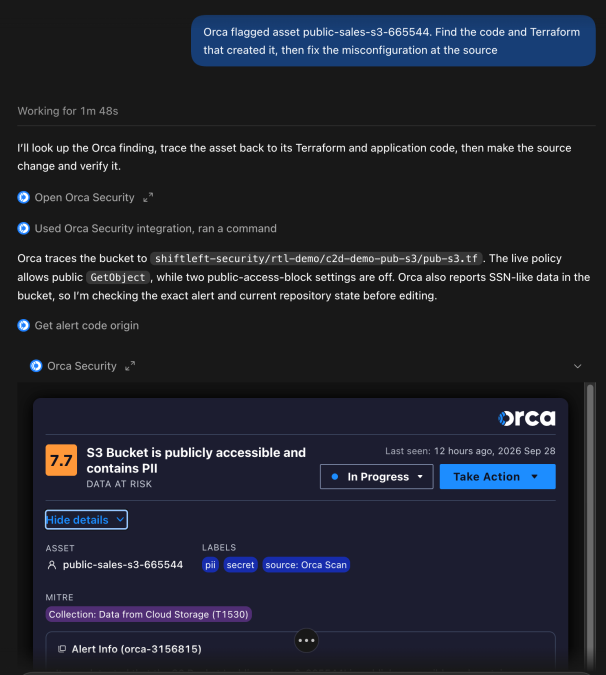
Scenario: A public-facing asset in production has a critical misconfiguration, and nobody knows which repo created it.
Orca flagged asset <asset_id>. Find the code and Terraform that created it, then fix the misconfiguration at the source
Codex uses Orca’s code origin and Terraform chain data to find where the asset came from. It fixes the template, not the running resource, so the problem does not come back on the next deploy.
Why install Orca Security’s OpenAI Plugin?
AI assistants are only as useful as the context they can reach. Without it, ChatGPT gives you a good explanation of a CVE. With Orca, it tells you which of your assets are exposed, which ones an attacker can reach, and what to fix first. Codex stops writing generic security fixes and starts fixing the findings Orca already prioritized in your cloud.
Security and engineering teams now work from the same risk picture, in the tools they already use every day. The result is the same investigation, triage, and remediation work, done in minutes instead of hours.
How to install the Orca plugin in ChatGPT and Codex
The Orca Security plugin is available now in the ChatGPT and Codex plugin directory. Setup details live in the documentation. Not an Orca customer yet? Sign up for a demo and ask your cloud a few questions.
About the Orca Platform
Orca delivers security for the companies that build. As cloud, code, AI and app generation expand the attack surface, Orca transforms security risk into the context teams need to act. The Orca Platform provides complete visibility across cloud, AI, and application environments, correlates risk across every layer, and prioritizes the exposures that matter most so organizations can remediate faster and innovate with confidence. Trusted by hundreds of organizations, including SAP, Autodesk, Gannett, and Digital Turbine, Orca is backed by leading investors including Temasek, CapitalG, ICONIQ Capital, and Redpoint Ventures. Learn more at orca.security.



 Chat with an Orca Expert