

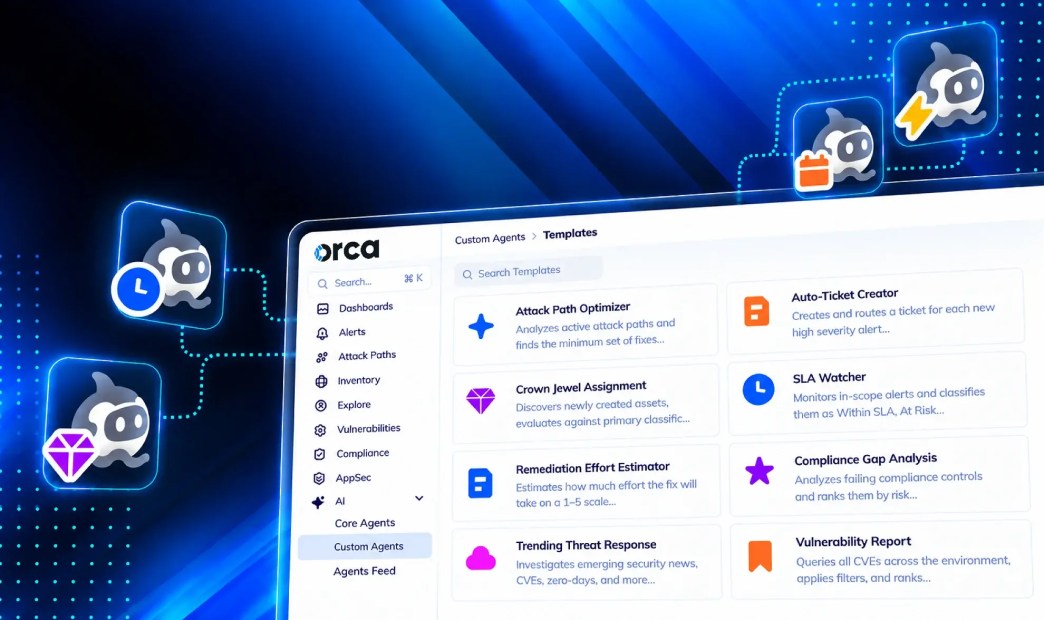

A security platform can tell you that a storage bucket is public, that a container image carries a critical CVE, or that a role has overly permissive cloud identities . What it can’t tell you on its own is who owns the problem, how fast your policy says it has to be fixed, or whether the asset is one your business can’t afford to lose.
That information exists. It lives in your tagging standards, your business unit structure, your SLA policy, and the heads of the people who have been on the team longest. It rarely lives in the tool that generates the alert. So every finding goes through the same manual step: someone reads it, works out who owns it, checks the policy, and decides what happens next.
Orca Custom Agents close this gap. Custom Agents let you codify your organization’s rules into the workflow itself, so Orca applies them every time instead of waiting for an analyst to remember them.
Why does detection get faster while remediation stays slow?
Over the last decade, cloud security tooling has become very good at finding problems. Agentless scanning means full coverage in hours instead of months, and a unified data model means a vulnerability, a misconfiguration, and an exposed identity can be linked into a single attack path.
Remediation hasn’t kept pace, and the reason is structural. Fixing an issue depends on context that the detection layer doesn’t have:
- Ownership: Which team, business unit, or application owner is responsible for this asset?
- Business criticality: Is this asset part of a payment flow, a regulated data set, or a customer-facing service?
- Policy: Does your SLA give this finding 7 days or 90? Who gets escalated when it slips?
When that context lives outside the platform, every alert waits in a queue until a human adds the context. Tickets bounce between teams. SLAs are tracked in spreadsheets. Crown jewel lists drift out of date as new assets are created.
The bottleneck in remediation is not detection. It’s the organizational context that has to be added by hand before anyone can act.
What are Orca Custom Agents and how do they work?
A Custom Agent is an AI agent you configure inside Orca with your own instructions, scope, trigger, and tools. You can start from a template, such as SLA Watcher, Daily Summary, or Attack Path Optimizer, or build one from scratch.
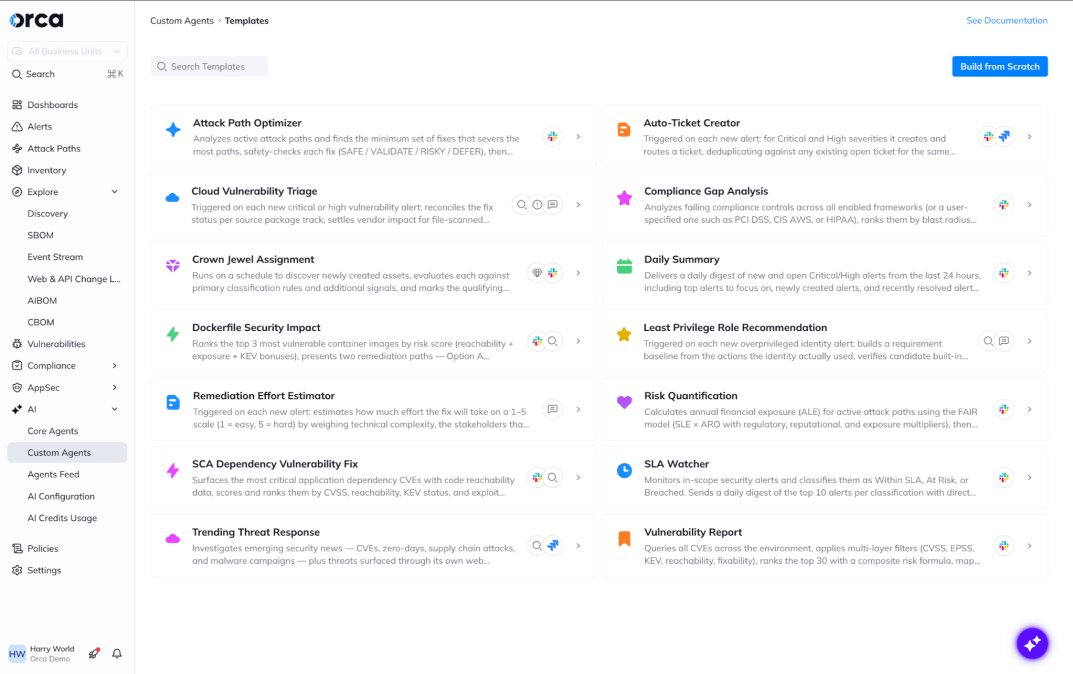
Every Custom Agent has four parts:
- Instructions: These are written in natural language and structured as Role, Instructions, and Output. This is where your organizational rules go. Type @ to reference a business unit directly, and / to add a tool.
- Context: Run the agent against your whole environment (Global Context) or against a single alert (Alert Context).
- Trigger: Run it manually, on a schedule (daily, weekly, monthly, or quarterly), or from an alert automation.
- Tools: Actions the agent can take, including changing an alert’s status or score, adding a comment, marking an asset as a crown jewel, searching the web, and sending results to Jira, Slack, or email.
Before you save, the Format button reviews your instructions and flags missing details, such as the scope the agent should work on or what it should produce on each run.
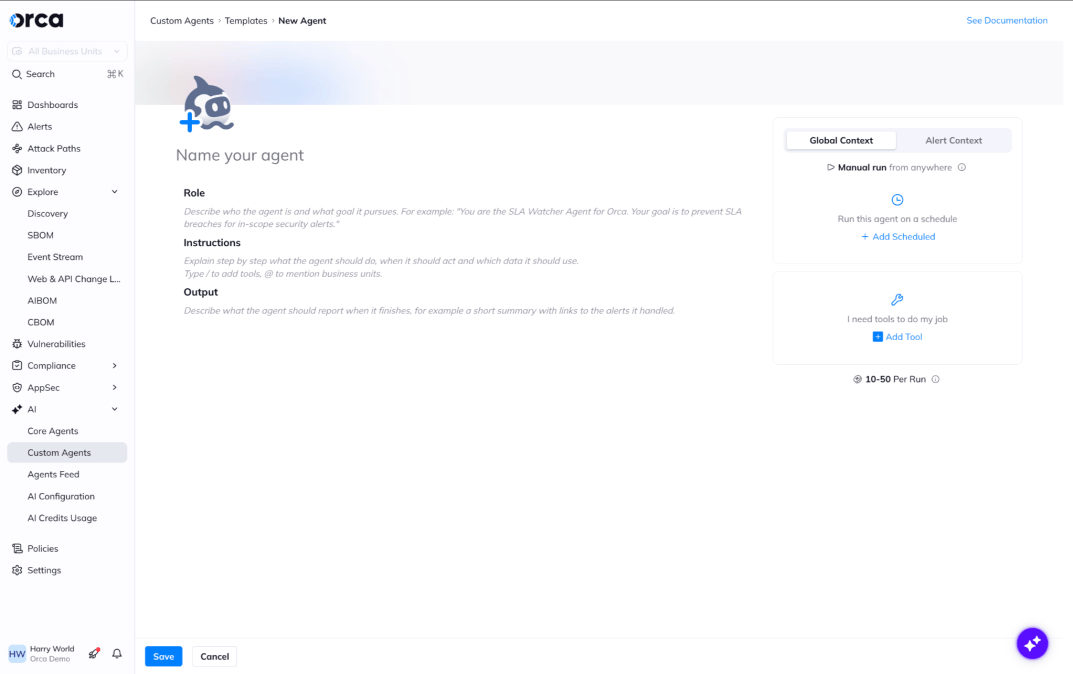
Every new agent starts with a Role, Instructions, and Output structure, so your rules are written down the same way each time.
How to turn your tagging standard into crown jewels in Orca
Crown jewels are central to how Orca prioritizes risk. An attack path that ends at a crown jewel is scored more urgently than one that ends at a test instance. Many organizations already classify their critical assets through their own tagging, asset naming practices, and governance processes. However, marking each asset by hand doesn’t scale as new resources are created every day and risk dynamically changes.
For example, any asset with a relationship to sensitive data stores or any asset with a linked role that has high permissions in production accounts may deserve to marked as crown jewels, but it currently requires a human to notice this context and manually update any tagging system, data table, or centralized knowledge repository with this new crown jewel.
A scheduled Custom Agent can apply your classification standard for you:
- Context: Global Context
- Trigger: Schedule, weekly
- Tools: Mark Asset As Crown Jewel, Send Slack Message
In the instructions, you share any business logic that would direct the agent to mark an asset as a crown jewel. The result: your crown jewel list follows your governance standard automatically, no matter how complex the business logic, and every attack path calculation in Orca reflects the assets your business has already decided matter most. That’s how teams know where your real cloud risk lies.
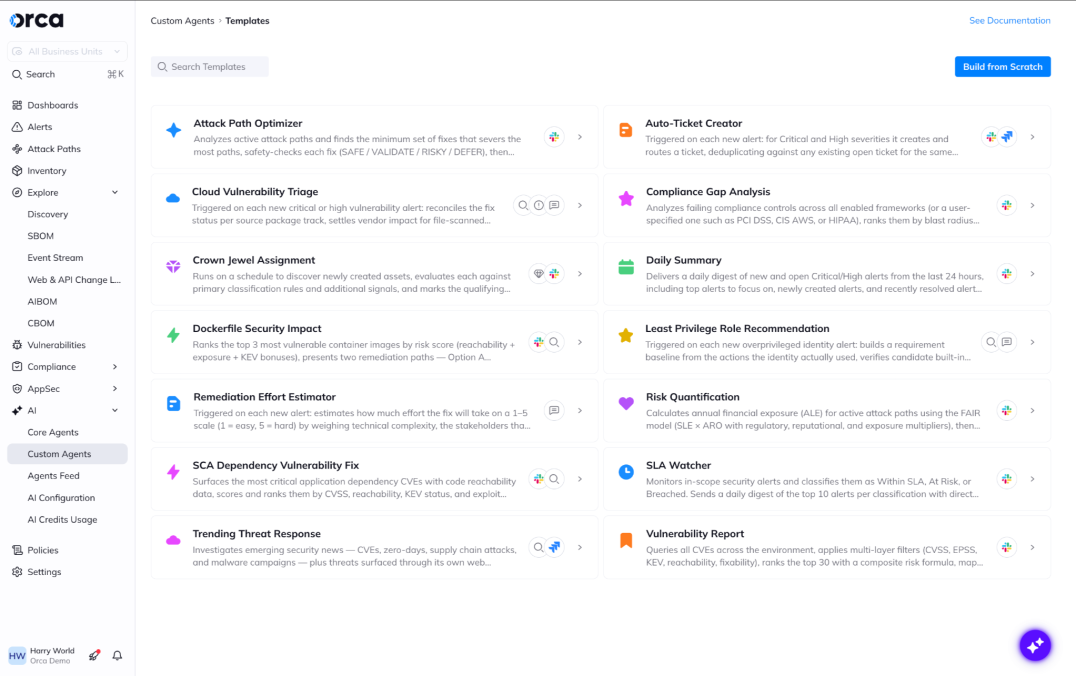
Every agent in Orca, whether it is a Custom Agent or Core Agent, has their own identity and defined permissions. This means that every Orca AI agent is fully auditable. Every action performed by an Orca AI agent gets logged on a timeline, and you can see every run in the Agents Feed, filtered by agent, trigger, and status.
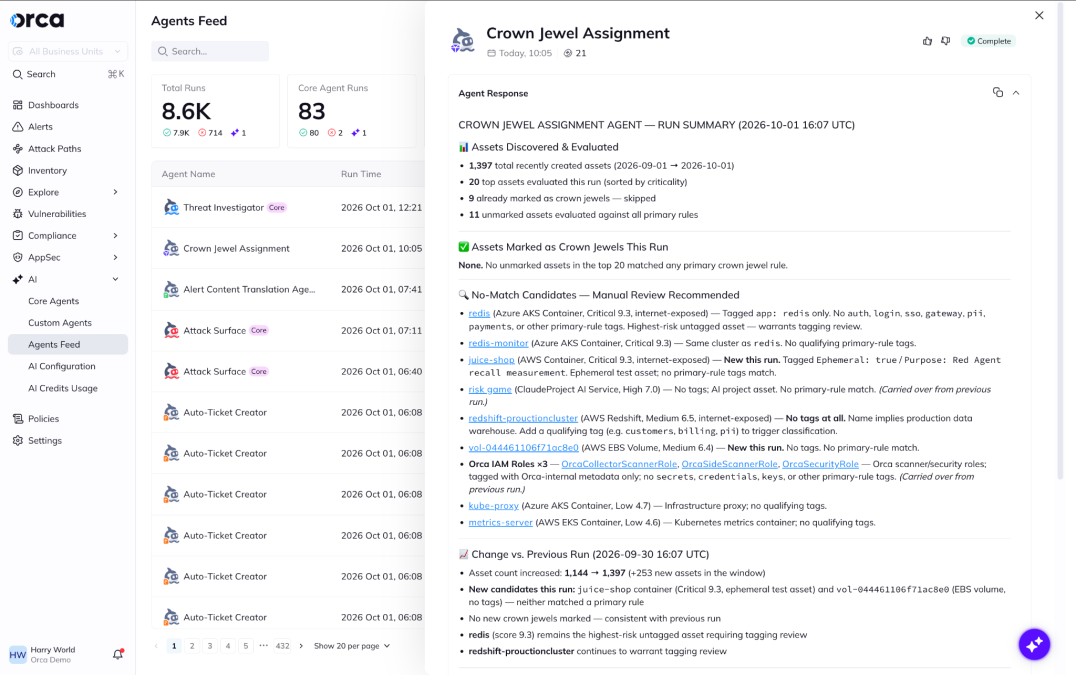
Caption: The Agents Feed records every agent run, what triggered it, and what it did.
How to enforce a security SLA policy by business unit
Most security teams have an SLA policy. Far fewer have a reliable way to enforce it, because the policy usually varies by business unit, severity, and asset type, and tracking it means exporting alerts and comparing dates by hand.
Start from the SLA Watcher template and add the rules that are specific to your organization:
- Context: Alert Context
- Trigger: Automation, for example every new critical or high alert in production accounts
- Tools: Add Alert Comment, Open Jira Cloud Ticket, Send Email Alert Message
In the instructions, write the policy the way your team already describes it: critical findings on internet-facing assets in @Payments are due in 7 days; high findings in @Internal-Tools are due in 30. The agent comments the due date on the alert, opens the ticket in the right Jira project, and emails the escalation contact when a finding on a crown jewel has no owner. You could also add instructions for the agent to send weekly and/or monthly Slack reports to continuously monitor crown jewels without an owner.
Why apply organizational context in Orca instead of in Jira or a SOAR playbook?
You could apply these rules downstream, in a ticketing system or a SOAR playbook. The problem is that by then the context arrives too late. Orca’s risk scoring, attack path analysis, and prioritization all run before the ticket is created. If crown jewel status and business unit ownership are only known downstream, the alert was scored without them.
Putting organizational context into Orca means the context shapes prioritization from the start. Take the same misconfiguration on two assets. On a sandbox account it stays a routine finding. On a payment system marked as a crown jewel, it ranks higher in Orca’s prioritization, and the SLA agent gives it a 7-day deadline and an owner.
Want to see how Custom Agents would apply your organization’s rules? Book a personalized demo.
About Orca Security
Orca Security delivers security for the companies that build. As cloud, code, AI and app generation expand the attack surface, Orca transforms security risk into the context teams need to act. The Orca Platform provides complete visibility across cloud, AI, and application environments, correlates risk across every layer, and prioritizes the exposures that matter most so organizations can remediate faster and innovate with confidence. Trusted by hundreds of organizations, including SAP, Autodesk, Gannett, Lemonade, and Digital Turbine, Orca is backed by leading investors including Temasek, CapitalG, ICONIQ Capital, and Redpoint Ventures. Learn more at orca.security.




 Chat with an Orca Expert