



Post-quantum deadlines are no longer a distant line on a roadmap. US federal agencies owed their PQC migration plans in October. High-value federal systems must move key establishment to post-quantum cryptography by the end of 2030. And the EU expects member states to start cryptographic inventories by the end of this year, with contractors, regulated industries, and their suppliers next in line.
Yet the first step is still where most teams stall. Knowing RSA and ECC have to go tells you nothing about where they run in your cloud, which of those assets face the internet, what data they protect, or what breaks if you change them. Without those answers, teams either try to boil the ocean with a spreadsheet inventory or let PQC sit in the backlog until the next audit.
The cloud makes this harder than most environments. Cryptography is spread across managed key services, load balancers, certificates, SSH keys, VPN tunnels, container images, and code, and it changes every time someone deploys. A spreadsheet inventory is out of date the day it’s finished.
That’s why we’re expanding Orca’s post-quantum cryptography capabilities. Building on the PQC compliance framework we launched in July, Orca now gives teams a live inventory of their cryptography, a clear read on how exposed each key and certificate is to quantum attacks, and one place to track readiness. This post covers what’s new, then shows it in action on a real example.
What’s new in Orca for post-quantum cryptography
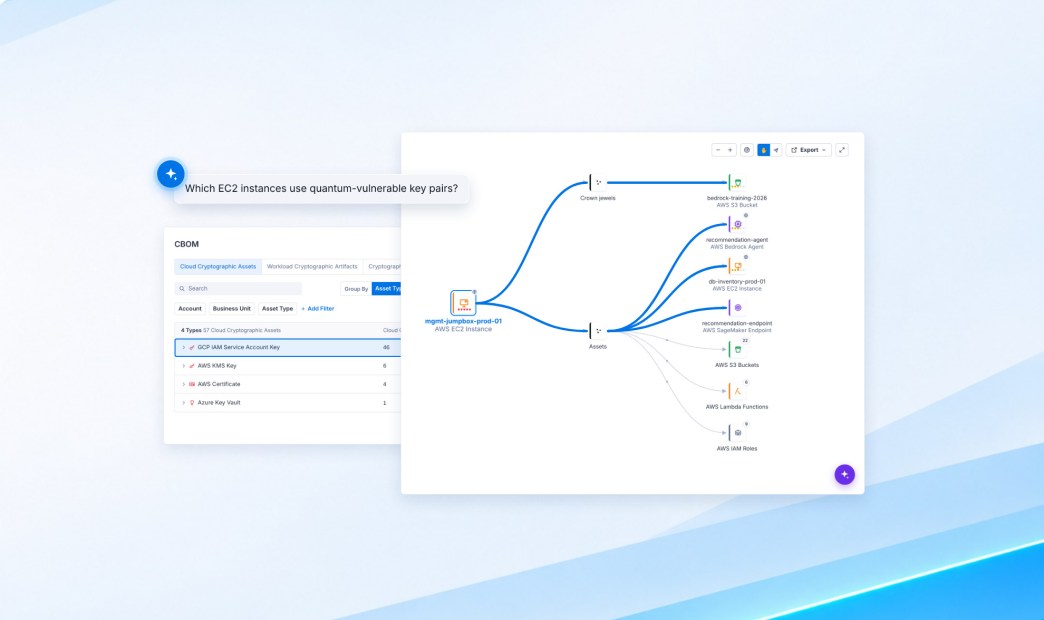
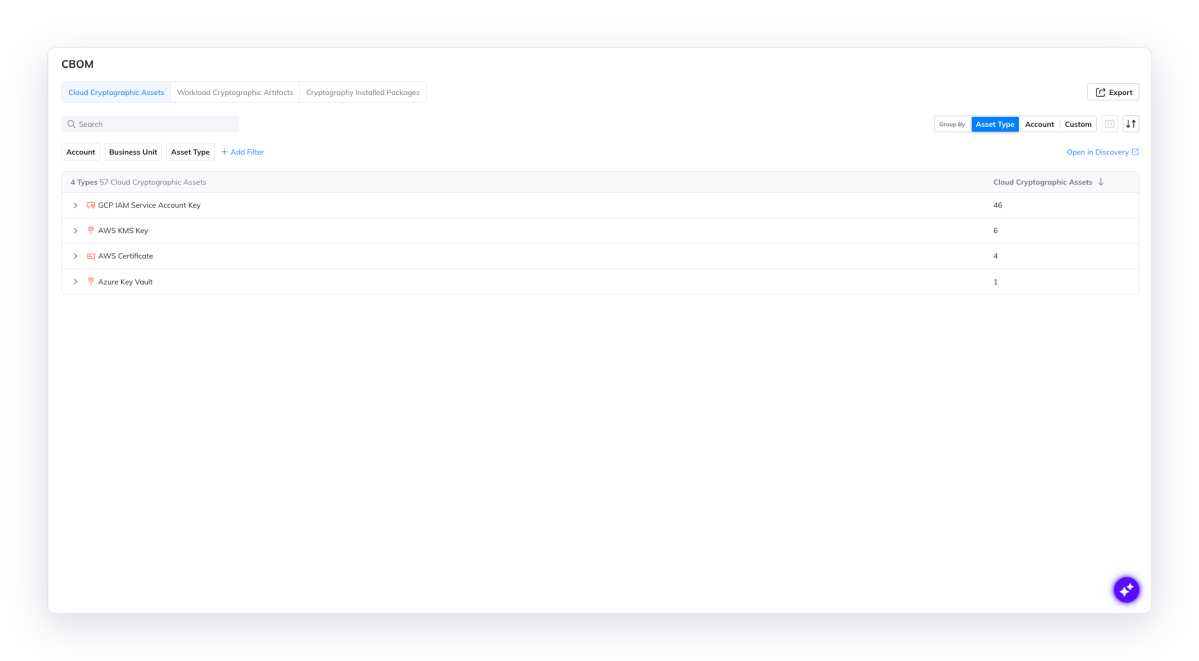
- Cryptography Bill of Materials (CBOM). See every key, certificate, key pair, and cryptography library across your cloud in one live inventory. CBOM shows algorithms, key lengths, and expiration dates for cloud keys and vaults, the SSH keys and key files sitting on your workloads, and the crypto packages they run. Export it in CycloneDX for auditors, customers, and GRC tools.
- PQC Impact. Know at a glance which cryptography quantum computing will break. Each key and certificate is rated Vulnerable, Weakened, or Resistant based on its algorithm and key length, so you can filter and group your inventory by quantum risk instead of decoding algorithm names.
- PQC Alerts view. Work every post-quantum finding from one place. A dedicated PQC view on the Alerts page gathers all quantum-related alerts, each tied to the affected asset and enriched with Orca’s cloud context.
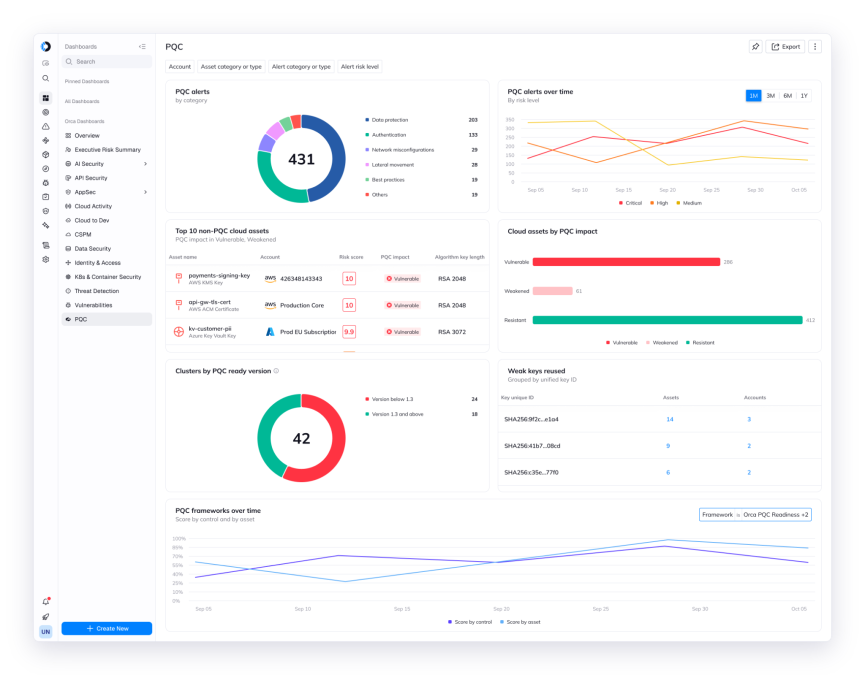
- PQC Dashboard. Show leadership where you stand and how fast you’re moving. A pre-built dashboard tracks quantum-vulnerable cryptography and migration progress over time, ready to share with the board or an auditor.
- PQC Runtime Detections. Catch harvest-now, decrypt-later (HNDL) attacks while the traffic is being collected, not years after. Three new detections flag the ways attackers capture encrypted traffic in the cloud: a network capture tool executed on a host, cloud network traffic mirroring enabled, and TLS session key logging enabled.
These sit alongside the Orca for Post Quantum Cryptography compliance framework, which maps findings to post-quantum standards and organizes them by urgency.
Four questions to prioritize quantum risk
Whatever deadline you’re working toward, prioritizing PQC comes down to the same four questions. Orca answers each one from a single platform for cloud security, across every account, cloud, and workload.
- Where does quantum-vulnerable crypto live?
- How vulnerable is it?
- Is it internet exposed?
- What can it reach?
Each answer narrows the list for the next, so an inventory of thousands of keys and certificates ends with a short, ranked migration plan. Here’s how that looks on a real example.
Example: A quantum-vulnerable key on a production jump box
Take a common finding, like a production jump box in AWS that admins log into with an RSA key pair. Jump boxes exist to reach everything else, so whoever holds the key holds the door. A capable quantum computer could derive that private key from its public half, which means an attacker can collect the public key today and break in later.
Here’s how Orca takes you from the mandate to a fix.
Step 1: Find where quantum-vulnerable cryptography lives
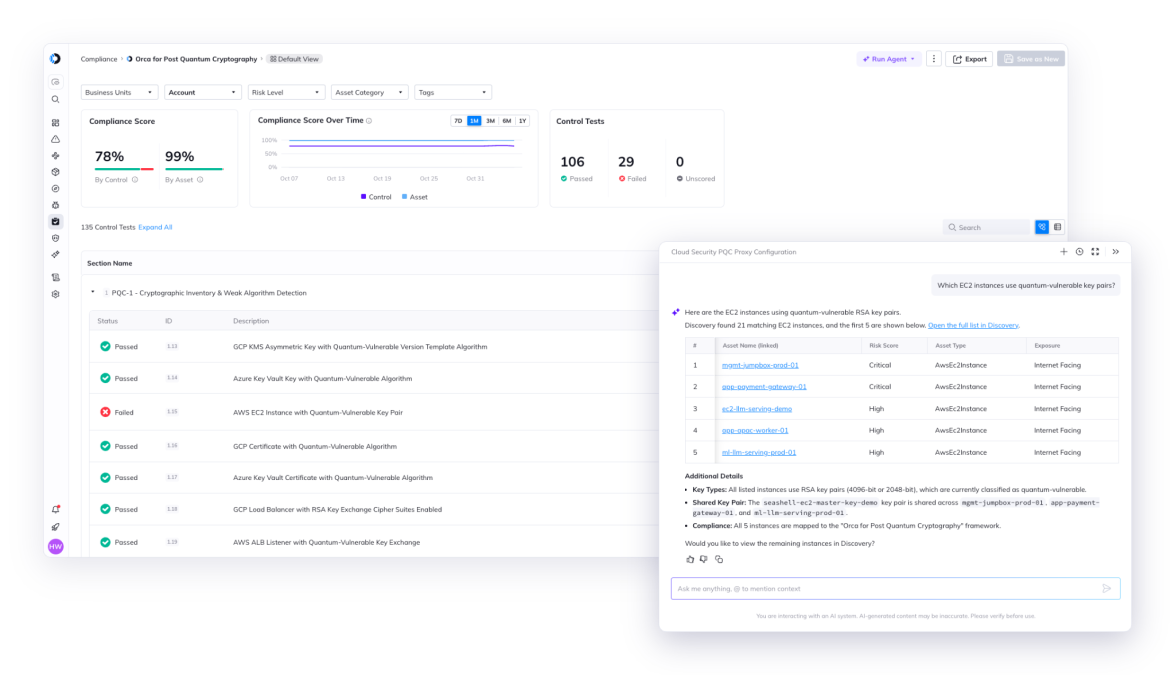
Open the new PQC view on the Alerts page, or the Orca for Post Quantum Cryptography framework in Orca’s multi-cloud compliance, to see every quantum-related finding across your clouds. In our example, Orca flags 21 EC2 instances that use quantum-vulnerable key pairs, out of 34 in scope.
Prefer plain English? Ask Orca AI, “Which EC2 instances use quantum-vulnerable key pairs?” and get the same answer in seconds.
Step 2: Check how vulnerable it is
Not every finding carries the same quantum risk. Orca’s new PQC Impact rating sorts cryptography into Vulnerable (broken by a quantum attack), Weakened (reduced but not broken), and Resistant.
Click into the finding for mgmt-jumpbox-prod-01. Orca explains the risk in plain language, showing that the instance uses an RSA key pair, and its PQC Impact is Vulnerable.
Step 3: Check whether it’s internet exposed
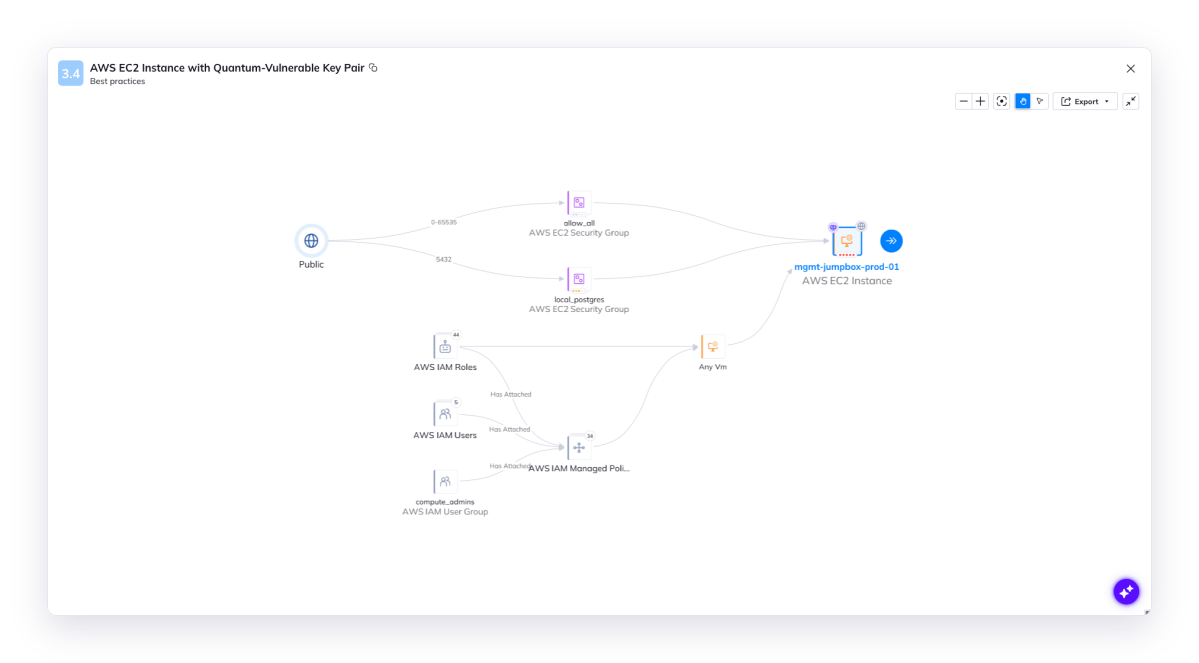
A vulnerable key matters most when attackers can reach the host it unlocks. Orca’s exposure view shows this jump box is open to the internet on every port, along with the IAM roles, users, and groups that can reach it. Internet-facing hosts go to the top of the list. Internal-only ones still get fixed, just on a longer timeline.
Step 4: Map what it can reach
A jump box is only as dangerous as what sits behind it. Orca’s attack path analysis shows this one can reach a crown jewel S3 bucket holding AI training data, a Bedrock agent, a SageMaker endpoint, and a production database, plus dozens more buckets, functions, and roles. The key protecting this host is also protecting the path to your models and their data.
Step 5: Turn findings into a migration plan
One jump box is a fix. Hundreds of keys and certificates is a program, and a program is what the mandates ask for. US federal agencies must now submit PQC migration plans, and contractors, regulated industries, and their suppliers are increasingly asked for the same by customers and auditors.
Run the same four questions across every finding, and they sort into waves. Internet-exposed assets with a path to crown jewels get fixed now, internal assets with limited reach come next, and findings with no post-quantum option from the cloud provider yet get tracked until one arrives. Group your CBOM by PQC Impact to size each wave, then export it as the inventory behind your plan.
Another option is to connect the Orca MCP Server to the AI assistant your team already uses, like Claude or Cursor, and ask it to build a PQC migration plan. Because the MCP Server pulls straight from Orca, the plan reflects your real environment. You get a wave-by-wave plan grounded in live cloud context, not a generic checklist.
Go further with Orca: Fix, track, and prove progress
That’s the prioritization of a single finding done. PQC migration is a multiyear program though, and Orca helps with the rest too.
Catch harvest-now, decrypt-later attacks. Migration takes years, and attackers aren’t waiting for it to finish. In an HNDL attack, they collect encrypted traffic today and store it until a quantum computer can break it. Orca’s new runtime detections cover the three ways to collect that traffic in the cloud: capture tools running on a host, traffic mirroring on a cloud network, and TLS session key logging. Each alert comes with Orca’s cloud context, so you can see what the affected workload can reach and respond fast.
Prove progress to leadership: When the board asks how ready you are, you shouldn’t need to pull a spreadsheet together to answer. The new PQC Dashboard shows how much quantum-vulnerable cryptography is left, and that number drops as teams migrate, so one view shows both your exposure and your progress.
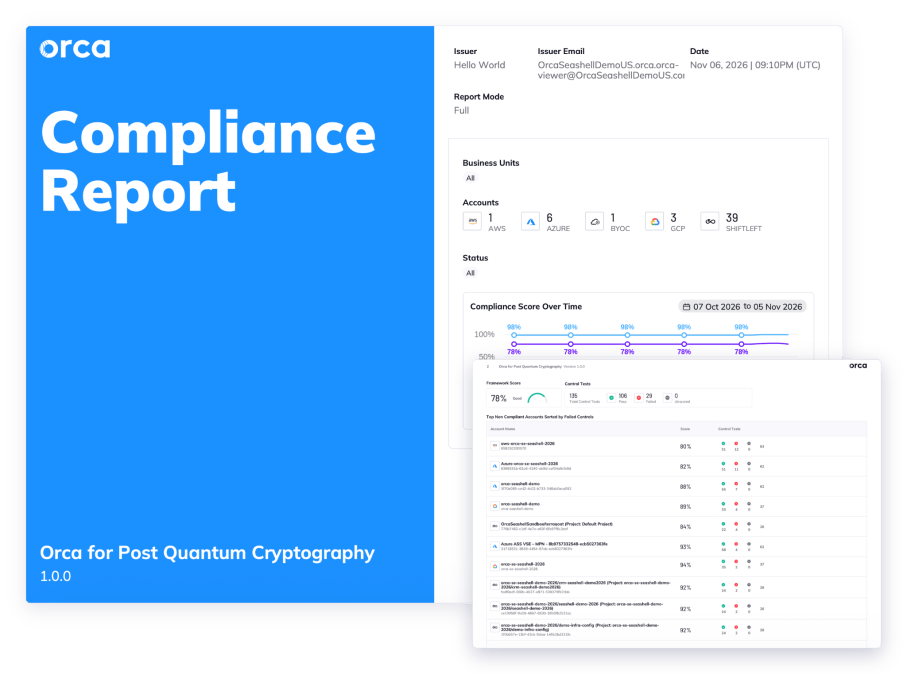
Stay audit-ready. Mandates and auditors want the same things, which are an inventory, a plan, and evidence of progress. Orca’s PQC framework maps findings to NIST and the EU Cyber Resilience Act, alongside 200+ other customizable frameworks, so you can generate a shareable report in one click instead of assembling evidence by hand. And when an auditor, engineer, or customer asks for your cryptographic inventory, export your CBOM in CycloneDX and hand it over.
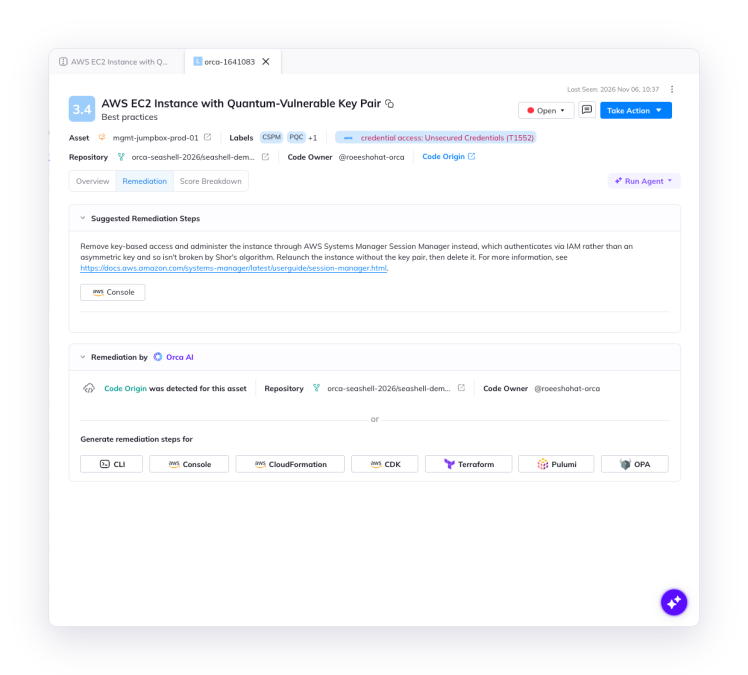
Cut the time to fix: Orca tells you what to do, not just what’s wrong. AWS doesn’t yet offer a post-quantum key type for EC2, so swapping the algorithm isn’t an option for our jump box example above. Instead, the recommendation is to drop key-based access and use AWS Systems Manager Session Manager, which authenticates through IAM instead of a key vulnerable to quantum computing.
From there, Orca does the heavy lifting. Orca AI generates the fix in CLI, CloudFormation, Terraform, and more, so engineers start with ready-to-run remediation instead of a blank page. Code Origin traces the jump box back to the infrastructure-as-code template and the team that deployed it, so the fix lands with the right owner and gets made at the source. Fix the template once, and every future instance launched from it comes up without a quantum-vulnerable key. Tickets open in Jira, ServiceNow, and Slack with the details already filled in, keeping the work inside your existing workflows.
Keep weak crypto from creeping back in. Teams keep shipping while the migration runs. Orca scans continuously, so a new key, certificate, or listener using RSA or ECC shows up in your CBOM and the PQC Alerts view as soon as it’s deployed, and you don’t migrate the same risk twice.
A repeatable workflow for the next PQC deadline
Post-quantum deadlines will keep landing, and migrating every key and certificate at once isn’t realistic. The teams that stay ahead know where quantum-vulnerable crypto lives across their environment, and which of it needs to move first.
Orca helps you do exactly that. With CBOM, PQC Impact, the PQC Alerts view, and the PQC Dashboard, the Orca Cloud Security Platform shows where vulnerable crypto runs, how exposed it is, what it can reach, and how your migration is progressing. One jump box is the example. The same workflow works for every key, certificate, and tunnel that comes after it.
See it in your own environment. Request a demo and we’ll show you what your cryptographic footprint looks like across your cloud. To go deeper on Orca’s PQC capabilities, download the data sheet.





 Chat with an Orca Expert