




The Orca Research Pod recently found that 51% of organizations have adopted AI to build software, yet 81% have critical vulnerabilities in AI packages (Hacker Valley News, 2026). In 2025, CVE-2025-48757 showed how a single missing database policy in AI-generated Supabase projects exposed data across more than 170 production apps.
None of these apps went through a pull request or a security review. People outside engineering built them, often over a weekend, from accounts the security team had never seen.
When we introduced AI AppGen Security, we made the case that AI app builders turned every employee into a builder, and that the platforms those apps run on need security built for how they work. We started with integrations for Claude Enterprise and Vercel.
The first question we heard from security teams: how do I connect a platform I don’t know we use? Nobody files a ticket for a budget-forecasting app built on Lovable, and the marketing team’s campaign portal never reached architecture review. You can’t connect what you’ve never heard of.
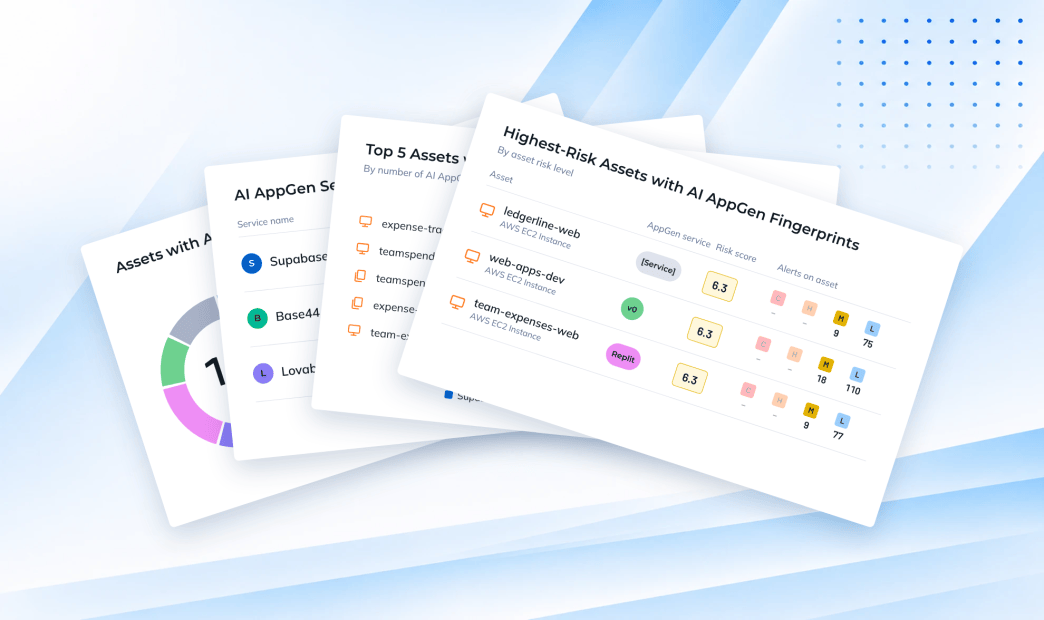
AI app builders leave fingerprints in the DNS, workloads, code, and cloud identities Orca already scans agentlessly. Orca now flags them, so you can find AI-built apps nobody told you about and see what data they can reach. Below, we walk through why your current tools miss these apps, how Orca finds them, and what to do once you know.
Why the usual discovery paths miss AI-generated apps
You’d expect at least one of your existing tools to catch these apps. Here’s why none of them do.
Secure web gateways and CASBs see the visit, not the app. They can tell you an employee opened Lovable or Replit. They can’t tell you what was deployed, what data it holds, or whether it requires a login.
SSPM sees sign-ups through your identity provider. It reads IdP logs and OAuth grants, which shows the SaaS your employees signed up for with a work email. An app built from a personal account never touches your IdP.
AppSec scans the repositories you point it at. If a builder’s bot created the repo in a workspace security has never seen, nobody points anything at it.
Cloud security sees the evidence but doesn’t connect it to the service. A CNAPP already inventories the DNS record, the IAM user, and the package on the VM. Until now, a subdomain resolving into a builder’s IP range was just an address, and an IAM user created by an app builder was just an IAM user. The data was there. Nothing tied it to the service behind it.
Every one of these tools waits for someone to connect a system, a user, or a repo first. The apps that matter most are the ones nobody connected to.
How does Orca find apps nobody reported?
Services that run outside your environment still leave traces inside it. Orca already scans your cloud accounts, workloads, repositories, and external attack surface, so the traces are already in its data.
A fingerprint is an observed trace that ties an asset you own to an external service. Orca stores each one in its unified data model, where you can query it like any other asset. Each one records the service, the type of evidence, the exact value that matched, and when Orca first saw it.
To find these fingerprints, there’s no new agent to deploy, no vendor API to authorize, and nothing for the builder to opt into. Here’s where the evidence comes from:
- Your external attack surface. DNS records whose values point into a builder’s or host’s infrastructure, vendor domain-verification records, and response headers showing a site is set up to load inside a builder’s live editor.
- Your workloads. SideScanning already inventories installed packages and reads files across VMs and container images. Some builder packages only work inside the builder’s own development environment, so if one shows up on a workload, the project started there. File markers matter as much as packages, because production builds often strip out dependency manifests. Without file markers, package inventory can come back empty on the very images running an AI-built app.
- Your code repositories. When an AI builder writes code, it commits under its own bot identity. That identity survives every human edit that follows, so the commit author is the most reliable sign a builder was involved.
- Your cloud identities. When an app builder or its host connects to your cloud, it leaves an identity behind: an IAM user or role it authenticates as, a trust policy that lets it in, and a permissions policy naming what it can read. It’s also the only source that tells you what company data the service can reach.
Orca matches what a record points to, not what it’s called. A subdomain named lovable-test that points to a private IP doesn’t get flagged, and an app hosted on Vercel isn’t counted as built with v0. A discovery screen that flags every string with a vendor name in it gets muted within a week.
What can security teams do with the results?
Finding the app is the first step. Next you need to know what it can touch, and get it covered.
Detect: see every AI app service in use, and the evidence behind each one. Findings appear in three places:
- AI AppGen Fingerprints have a dedicated Service Fingerprints view grouped by service type and then by service.
- On each asset’s page, every fingerprint on that asset is listed with the value that matched.
- Dashboard widgets summarize what’s detected, what’s connected, and posture for connected services.
Connect: turn a finding into coverage. Where Orca supports a platform you haven’t connected, the fingerprint comes with a Connect action. Detection shows you which connections are worth making. Connecting turns on posture checks inside the platform, like flagging Supabase projects with row-level security turned off.
Why the evidence matters more than the count. Picture two Lovable apps, both found by Orca on the same day:
- A marketing landing page. It has a DNS record pointing at the builder and nothing else: no cloud identity and no access to company data.
- An internal expense tracker. It has the same DNS record, plus an IAM user Lovable created in your AWS account, with a policy that can read a bucket of customer records.
A tool that counts apps tells you there are 2. What you need to know is that one of them can read customer data.
That’s why the cloud identity fingerprint matters most to a CISO. The policy attached to a builder’s identity has a Resource element that names the buckets, datasets, and query workgroups it can reach.
Finding the AI app builder is only half the answer. The other half is naming the crown jewels the AI-built app can read.
Fingerprints are findings, not alerts. They don’t open alerts or change an asset’s risk score. They give you an inventory to govern from: decide which AI app builders your company allows, then use the Service Fingerprints view to spot the ones you don’t.
One limit to know about: DNS fingerprints cover only the zones Orca can read. The dashboard shows whether your DNS provider is connected, so a zone Orca can’t see never looks clean.
Which services does Orca detect?
Orca fingerprints these services:
- AI app builders: Lovable, Vercel, v0, Replit, Base44, Netlify, and Bolt
- Data services: Supabase
Where Orca has integrations set up with these services, security teams can connect and secure those AI platforms.
Your builders will keep shipping apps nobody asked security about. Now you’ll know when they do, and what those apps can reach.
Want to see which AI app builders are already running in your environment? Request a demo and we’ll walk you through it.
About the Orca Platform
Orca Security delivers security for the companies that build. As cloud, applications, AI and app generation expand the attack surface, Orca transforms security risk into the context teams need to act. The Orca Platform provides complete visibility across cloud, AI, and application environments, correlates risk across every layer, and prioritizes the exposures that matter most so organizations can remediate faster and innovate with confidence. Trusted by hundreds of organizations, including SAP, Autodesk, Gannett, Lemonade, and Digital Turbine, Orca is backed by leading investors including Temasek, CapitalG, ICONIQ Capital, and Redpoint Ventures.




 Chat with an Orca Expert