




Table of contents
As cloud environments scale, IAM permissions often accumulate faster than teams can audit them, creating security gaps that increase breach risk
Every time a developer spins up a new resource, requests access to fix a production issue, or a team inherits an old IAM role that remains in use without review, the attack surface expands undetected. It should come as no surprise that identity and access is now among the most exploited vectors in cloud breaches. According to the 2025 Verizon Data Breach Investigation Report, “Use of stolen credentials” was the top action of basic web application attacks (BWAA) at 88% of the breaches analyzed in the report. Additionally, 30% of the incidents caused by unintentional mistakes, aka Miscellaneous Errors, were due to misconfigurations of servers, databases, etc.
Cloud identity security hasn’t increased as a common exploit vector because security teams aren’t paying attention. It’s because the scale of the problem has outpaced the tools they’ve been handed.
So what are the real challenges here?
The IAM challenge for dynamic environments
According to CSA’s State of Cloud and AI Security 2025 survey report, misconfigured cloud services or infrastructure contributed to 33% of breaches. However, the signal from this year’s data is clear: identity problems now drive outcomes. Among organizations that experienced a cloud-related breach, three of the top four causes were identity-related:
- Excessive permissions (31%)
- Inconsistent access controls (27%)
- Weak identity hygiene (27%)
Standing permissions, aka permanent permissions, are the new shadow IT. According to Orca’s 2025 State of Cloud Security Report, 78% of organizations have at least one IAM role that hasn’t been used in over 90 days. Organizations benefit from visibility into unused permissions – permissions that went unremoved simply because no one knew they existed. Unaudited permanent access increases security risk over time.
Findings without context are noise. Security teams don’t suffer from a lack of data. They suffer from a lack of signal. Knowing that an S3 bucket “has an external access finding” is almost useless on its own. You need to know whether that bucket contains PII, who owns it, and whether that access was intentional. Context is what turns a finding into a decision.
Third, internal access is just as dangerous as external. Many organizations face risks from both external and internal access patterns. Legitimate internal users and roles often have far more access than they need. This represents a massive lateral movement risk that often goes completely undetected.
These aren’t abstract concerns. They’re the daily reality for cloud security teams trying to enforce least privilege in environments that change continuously.
What is AWS IAM Access Analyzer?
AWS IAM Access Analyzer was built to bring certainty to a problem that has historically relied on guesswork. It continuously evaluates your resource policies, trust relationships, and IAM usage to surface three types of findings:
- External Access: resources accessible from outside your defined zone of trust
- Internal Access: trust paths and permissions within your AWS account or organization
- Unused Access: IAM roles, users, credentials, or permissions with no activity in the last 90 days
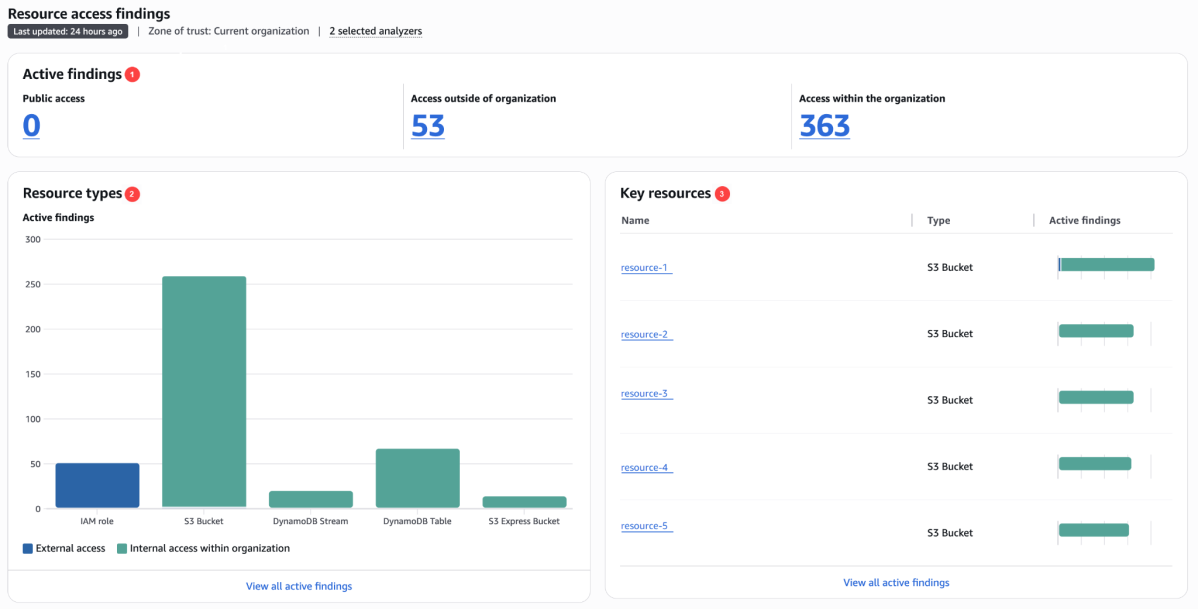
Unlike periodic scans, IAM Access Analyzer continuously monitors resource policies using automated reasoning to provide mathematically provable security analysis. And it covers the assets that matter most: Amazon S3 buckets, Amazon RDS DB cluster snapshots/ Amazon RDS DB snapshots, and Amazon DynamoDB tables.
The result is a uniquely reliable source of truth about who has access to what and who shouldn’t.
Gain Context-Rich Access Insights with Orca and AWS IAM Access Analyzer
While IAM Access Analyzer tells you what the access problem is, it doesn’t tell you how bad the problem is.
That’s the gap Orca fills.
Orca integrates IAM Access Analyzer findings directly into asset details, enabling security teams to examine access risks in context with the affected resource. This integration helps you quickly identify which resources are exposed, trusted internally, or over-permissioned. You can view all IAM Access Analyzer findings alongside asset metadata in a single interface, reducing the time required to assess and remediate access risks. The visibility enables you to validate intent and prioritize remediation based on actual risk rather than finding volume.
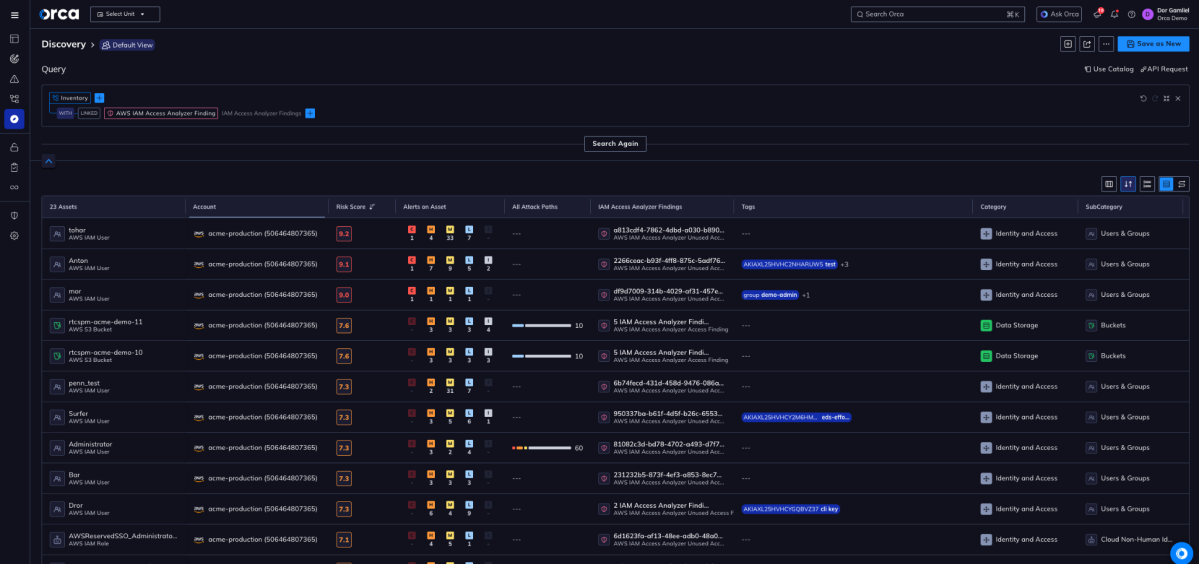
In practice, security analysts no longer need to pivot between multiple tools. They don’t have to jump between IAM Access Analyzer, their asset inventory, and a dozen other platforms to understand blast radius. All 500+ findings are queryable from Orca’s Discovery interface. This includes internal access, external access, and unused access findings. They’re broken down by type, linked to the specific asset in Inventory, and available directly on the asset’s IAM tab.
The workflow is simple and powerful: find a DynamoDB table with 160 IAM Access Analyzer findings. Click into it. See every finding — who has internal access, what trust paths exist, what’s gone unused. And if you need to take action in the AWS Console, a single click gets you there.
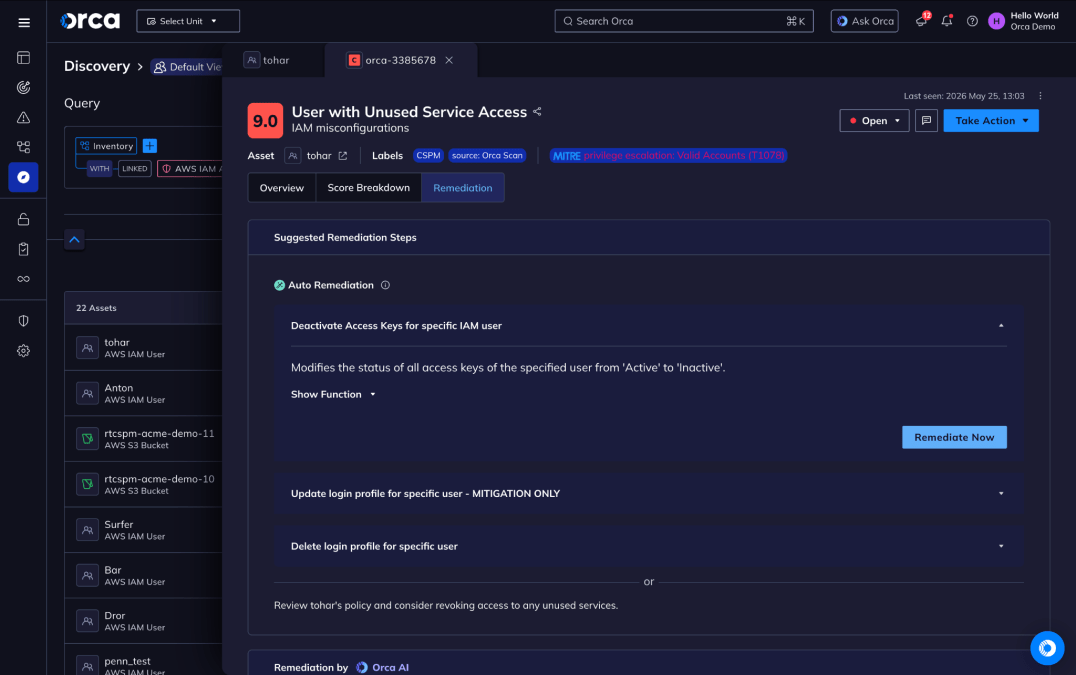
This is what the “better together” story actually looks like in practice: IAM Access Analyzer generates high-fidelity findings. Orca wraps those findings in the asset context that transforms them from noise into prioritized action.
With Orca and AWS IAM Access Analyzer working in concert, cloud identity doesn’t have to be a guessing game.
About Orca
The Orca Platform delivers a unified cloud security experience that helps organizations identify, prioritize, and remediate risk across their cloud environments, code, and AI.
Ready to see how Orca’s IAM Access Analyzer integration can help you close the identity gap? Follow documentation if you already use Orca and AWS, or schedule a personalized 1:1 demo.




 Chat with an Orca Expert