

Code Scanning: Essential Guide to Tools & Best Practices
Orca Security Team · 9-minute read
Key Takeaways
- Code scanning uses automated analysis to identify vulnerabilities and security issues across source code and related development artifacts. Static approaches inspect code without running the application, while dynamic approaches test a running build.
- NIST’s Secure Software Development Framework splits the work into two practices: reviewing human-readable code under PW.7 and testing executable code under PW.8.
- OWASP states that current static analysis tools “can automatically identify only a relatively small percentage of application security flaws.”
- A finding becomes work a developer will do when it carries the weakness class, the exact line, and evidence that the code path runs.
- Orca traces cloud risks back to their code origins and checks function-level reachability, so the queue reflects what an attacker can actually use.
Code scanning is the automated analysis of source code and related development artifacts to identify vulnerabilities, coding errors, exposed secrets, vulnerable dependencies, and insecure configuration. Static analysis engines commonly parse source code into structural representations and analyze control and data flow. Other scanner categories use different mechanisms. Some scanners examine code at rest. Others exercise a running build and watch how it responds.
Most teams reading this have already turned a scanner on. The problem that follows is rarely coverage. It is a queue of thousands of findings and a developer population that stopped opening the tickets. Nothing in that queue marks which entries an attacker could reach.
This guide explains the analysis mechanism rather than the category name. It covers how a scanner reasons about code it never executes and where that reasoning breaks. Static and dynamic approaches fail in opposite directions, and the fix for both is the same. The closing sections cover tuning and selection.
What is code scanning?
Code scanning is the automated examination of the artifacts that make up an application. The goal is to identify security weaknesses, bugs, and policy violations before release. Those artifacts include first-party source code, imported open source packages, committed credentials, and infrastructure templates.
The term carries a product association because of where searchers meet it. GitHub’s documentation describes code scanning as a feature that analyzes “the code in a GitHub repository to find security vulnerabilities and coding errors.” Treat that as one platform’s implementation of a general practice, since the techniques underneath it predate the product.
Scanning is one activity inside code security as a practice. The wider subject covers how you store code, who can change it, and how you sign what you ship. A scanner reports what is wrong in an artifact. It does not decide who may merge the fix.
How does code scanning work?
A scanner does not read code the way a person does. It builds a structural model of the program, then asks questions of that model. The sequence is consistent across engines. Understanding it explains both what these tools catch and what they get wrong.
How static analysis traces data from source to sink
The engine parses each file into an abstract syntax tree, a structured representation of the program’s grammar rather than its text. From that tree it derives a control flow graph, which records the order statements can execute in. It also derives a data flow graph, which records where each value originates and where it travels.
Analysis then runs as a search for paths. The engine marks certain expressions as sources, meaning values an attacker can influence: an HTTP parameter, a request header, a message from a queue. It marks others as sinks, meaning operations that turn dangerous when fed attacker-controlled input: a database query, a shell invocation, a file path. A rule fires when a path connects a source to a sink without passing through a sanitizer the rule recognizes.
Each rule is written against a weakness class rather than a specific bug. Those classes come from MITRE’s Common Weakness Enumeration. A path from a request parameter into a query string matches CWE-89, “Improper Neutralization of Special Elements used in an SQL Command (‘SQL Injection’).” Two scanners can disagree about the same line, because they disagree about what counts as a sanitizer.
How scanners find vulnerable dependencies and hardcoded secrets
Most of the code in an application arrives through a package manager. Composition analysis resolves the dependency tree from lockfiles and manifests, then matches each resolved version against advisory data. The output is a list of vulnerable package versions rather than vulnerable paths through your code. That difference is why static analysis, compared to software composition analysis, produces different queues from one repository.
Secret scanning works on a third principle again. It matches entropy thresholds and provider-specific patterns, so secrets detection finds a key shaped like an AWS access key or a private key header. A hit maps to CWE-798, “Use of Hard-coded Credentials.” The scanner cannot tell you whether that credential still works, what it grants, or whether someone rotated it the same afternoon.
What infrastructure as code security scanning checks
Application code is not the only thing in the repository worth analyzing. Infrastructure as code security scanning targets the templates that create cloud resources. The object of analysis becomes a Terraform module or a CloudFormation stack rather than a function. The engine evaluates declared properties against policy: a bucket with public access enabled, a security group open to the internet, an unencrypted volume.
The failure mode here is duplication rather than reachability. One permissive module reused across forty stacks produces forty misconfigured resources from a single mistake. Catching it in the template costs less than having to find and fix misconfigurations across your cloud after deployment. Scanning infrastructure as code is a distinct discipline with its own policy engines and gating decisions. IaC security covers the wider set of controls around it.
What are the benefits of code scanning?
The case for scanning rests on when the analysis runs rather than on what it finds. NIST’s Secure Software Development Framework states it under practice PW.7: automated methods lower the effort and resources needed to detect vulnerabilities. A defect caught in a pull request costs ten minutes of context a developer still has.
- Defects surface while the author still remembers the code. SSDF gives PW.7.2 the example of automated tools flagging unsafe practices as code is checked into the repository.
- Coverage holds as volume grows. OWASP notes that source code analysis “scales well” and “can be run on lots of software, and can be run repeatedly.”
- The output points at a line, not a symptom. OWASP describes SAST output as highlighting problematic code “by filename, location, line number, and even the affected code snippet.”
- Findings become policy rather than opinion. Rules written against named weakness classes give you something to gate on that survives an argument with a delivery lead.
These benefits are the practical content of shifting security left in the SDLC. They arrive only if the output stays small enough to read, which is the subject of the tuning section below.
Static vs. dynamic code scanning: how the two approaches differ
The split between analyzing code and testing a running build is not a vendor invention. NIST SP 800-218 separates them into two practices. PW.7 covers reviewing and analyzing human-readable code: “source code, scripts, and any other form of code that an organization deems human-readable.” PW.8 covers testing executable code: “binaries, directly executed bytecode and source code.”
One vulnerable pattern makes the difference visible. Picture a handler that reads a sort parameter from a request. It passes the value through a helper that builds an ORDER BY clause, then concatenates the result into a query. No parameterization anywhere on that path.
Static code scanning: reasoning about code that never runs
Static code scanning traces that path without executing a line. The engine identifies the request parameter as a source, follows the value through the helper, and reports CWE-89 at a specific line. It does this for every copy of the pattern in the repository, including the eleven in a legacy module nobody has deployed since 2023.
What the engine cannot see is whether any of it runs. It does not know whether the route is registered, whether an authentication filter guards the handler, or whether the module ships at all. The finding is a correct answer to the question the engine asked. That question was about the code, not about the application.
OWASP is direct about the consequences. Current SAST tools “can automatically identify only a relatively small percentage of application security flaws.” They produce “high numbers of false positives,” and it is “difficult to ‘prove’ that an identified security issue is an actual vulnerability.” OWASP adds that these tools are “frequently unable to find configuration issues, since they are not represented in the code.”
Dynamic code scanning: evidence from a running build
Dynamic code scanning inverts the problem. A dynamic application security testing tool sends a crafted value to the live endpoint. It reads what comes back: a database error, a changed result set, a measurable delay. That response is evidence, and nobody has to argue about whether the sanitizer counts.
The blind spot is everything the scanner never requested. It found the endpoint it could reach and authenticate to. The eleven copies in the legacy module stay invisible, along with any path behind a workflow the crawler could not complete. The tool reports a symptom rather than a line, so a developer gets a URL and a payload and still has to find the code.
| Static code scanning | Dynamic code scanning | |
|---|---|---|
| What it sees | Every path through the source, including unreachable and undeployed code | Behavior of a running build at the endpoints it can reach |
| What it misses | Whether the code is deployed, routed, authenticated, or exposed | Code paths behind unreachable workflows, and every copy it did not request |
| Where it points | A file, line, and weakness class | A URL and a payload, with no line number |
| When it runs | On commit and pull request, before a build exists | After deployment to a test or staging environment |
| Characteristic false result | A confident report on code that never executes | Silence about a real flaw the scanner never reached |
| What proves it | Nothing, since the path is inferred | The application’s own response |
How reachability analysis prioritizes static and dynamic findings
Neither column fixes the other by being added to it. Running both leaves you with a large queue of unproven paths and a small queue of proven symptoms. Nothing orders one against the other.
Reachability analysis supplies the missing axis. Instead of asking whether a vulnerable pattern exists, it asks whether the code containing it is loaded and called in something that runs. Applied to the example, it discards the eleven legacy copies, keeps the one in the deployed handler, and raises it if that service is internet-facing. NIST anticipates the move in an SSDF example under PW.8.2: consider “the infrastructures and technology stacks that the software will be used with in production.”
Types of code scanning tools and the features that matter
Code scanning tools divide by what they analyze rather than by vendor. Static analyzers cover first-party code, composition analyzers cover dependencies, secret scanners cover committed credentials, and template analyzers cover infrastructure definitions. Dynamic testers cover running builds. The categories appear in SAST, SCA, and DAST compared, with named implementations in the roundup of open source application security tools.
What matters more than the category is the capability set any scanner needs before its output is usable at scale.
- Interprocedural data flow analysis. A rule that only matches a source and sink inside one function misses anything routed through a helper, which describes most real code.
- Findings mapped to named weakness classes. A CWE identifier on every result lets you deduplicate across tools and write policy against a class, not a vendor’s rule name.
- Output in a standard interchange format. The Static Analysis Results Interchange Format (SARIF) is an OASIS standard approved in 2020. It “defines a standard format for the output of static analysis tools.” GitHub states its code scanning “is interoperable with third-party code scanning tools that output” SARIF data.
- Incremental analysis on a diff. Scanning only what changed in a pull request is what makes a scanner fast enough for a required check.
- Baseline and suppression with an audit trail. You need to accept an existing finding without losing the record of who accepted it and when.
- Reachability or exploitability signal. Without it, ordering falls back to severity, and severity ranks an unreachable critical above a reachable high every time.
SAST code scanning best practices for a sustainable rollout
The failure this section prevents is specific. A team enables scanning across the estate, receives fourteen thousand findings, and watches developers stop reading the tickets. The gate comes off within a quarter. Nothing about that outcome is a tooling defect; it follows from treating first-run output as a work queue.
SAST code scanning becomes sustainable when you sequence the rollout rather than switch it on. Each step below depends on the one above it.
- Baseline the existing findings before gating anything. Snapshot what the scanner reports on the current default branch and exclude that set from the merge gate. Existing debt becomes a separate, scheduled effort.
- Scope the gate to changed code. Fail a pull request on new findings in that diff. The check stays fast and the result reaches the person holding the context.
- Tune the rule set to the stack before the second run. Disable rules for frameworks you do not use. An engine that does not recognize your ORM’s escaping will report common weakness enumeration matches on every query you have.
- Order the queue by reachability and exposure, not severity. A reachable high-severity flaw in an internet-facing service outranks a critical in a module that never loads. Attack path analysis extends the same ordering past the service boundary.
- Route findings to the code owner. Map the file path to the owning team and open the issue in their tracker. A central queue adds a handoff and a wait that direct assignment avoids.
- Record a triage decision on every dismissal. SSDF task PW.7.2 calls for recording and triaging discovered issues in the development team’s workflow. A dismissal without a reason looks like an oversight at audit time.
Sequencing works because of what a developer sees on first contact with the tool: a handful of findings in code they wrote that morning. The controls around the repository itself are covered in source code security practices.
How to choose code vulnerability scanning tools: 6 questions to ask
Selection is a different question from configuration, and most evaluations answer the wrong one. Nearly all code vulnerability scanning tools will find the obvious injection flaw in a benchmark application. An important differentiator shows up in the work a finding still requires after it appears.
Six questions decide the outcome. Ask them against your own repository, not a vendor’s sample.
- How much of the estate does one engine cover? Count the languages, frameworks, and package ecosystems in your repositories. A tool covering four of your seven languages leaves you buying a second one.
- What does it emit, and can something else read it? A tool that exports SARIF feeds a queue you already have. A proprietary format makes its console mandatory.
- Does a finding carry evidence of reachability? This decides whether your team fixes things or triages things. Ask to see the ordering logic, not the severity scale.
- How long does an incremental scan take? Anything past a few minutes on a diff invites steady pressure to drop it from the required checks.
- Can it explain a false positive, and can you teach it? Custom sanitizer definitions and per-path suppression separate tuning a tool from fighting it.
- What does it cost to consolidate? Counting consoles, agents, and integrations is the practical content of application security posture management.
One category deserves separate treatment during evaluation. AI coding assistants can increase the volume and speed of code entering the pipeline, which makes automated review and consistent security gates more important. That changes the shape of the review problem rather than its nature, and securing AI-generated code covers what it requires.
How Orca connects code findings to what is actually running
Every limitation in this article traces to one gap. A static engine reasons about paths through code it never executes, so it cannot tell you whether the handler is deployed or the service reachable. A dynamic scan proves one instance and stays silent about the rest. The context that resolves both sits in the cloud environment, not in the repository.
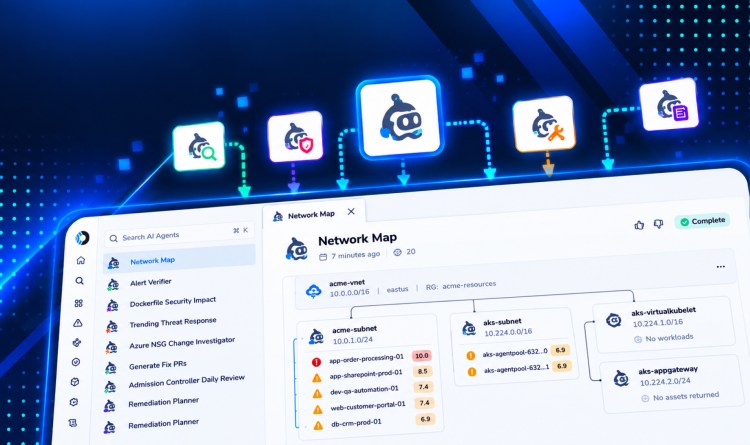
Orca scans the code plane directly to find vulnerabilities earlier in development, running SCA, SAST, secrets detection, and IaC scanning against developer code during every code review. The part that closes the gap is the direction of the link. Cloud-to-Dev tracing follows a risk found in a running cloud environment back to the code and IaC that produced it, so teams can connect code-level risk to production impact. Code Reachability Analysis checks function-level reachability, recognizing when the vulnerable function is actually being called.
The AppSec Triage Agent, part of Orca’s AI-powered investigation and remediation, then analyzes the code context of a finding to decide whether it is a false positive. That combination is what a cloud-native application protection platform is for. The scanner keeps finding the pattern and pointing at the line. Orca supplies the deployment, identity, and exposure context that decides which line a developer opens first.
Get a Demo to see how Orca connects code findings to the workloads running in your cloud.
Frequently asked questions about code scanning
How often should code scanning run?
Run incremental analysis on every pull request and a full scan of the default branch on a schedule. The two serve different purposes. The pull request scan protects the merge and has to finish in minutes. The scheduled scan catches findings created by new rules, new advisory data, or changes that made an old path reachable.
Can code scanning replace manual code review?
No, and the boundary is documented. OWASP lists authentication problems, access control issues, and insecure use of cryptography as categories that are difficult to automate. Each depends on intent the code does not state, so a scanner cannot tell that an authorization check queries the wrong tenant identifier. Automated analysis handles the classes with recognizable shapes and frees reviewer attention for the logic that has none.
What happens when two scanners report different results for the same file?
Compare the CWE identifiers before comparing the counts. Disagreement usually means the engines model sanitizers differently, and one recognizes your framework’s escaping function while the other does not. Normalizing both outputs to SARIF and deduplicating on weakness class, file, and line shows whether you have two findings or one finding described twice.
Should a failing scan block a deployment?
Block merges rather than deployments, and only on new findings above a threshold you set. Gating deployment puts the check at the point of highest pressure, when a release is waiting. That is where exceptions get granted and then become permanent. A merge gate on changed code fails earlier and costs less to satisfy.
Does code scanning satisfy a compliance requirement on its own?
Rarely, and the framework wording explains why. SSDF task PW.7.1 asks organizations to determine whether code review, code analysis, or both should be used. PW.7.2 asks that discovered issues be recorded and triaged in the development team’s workflow. The artifact an assessor wants is the decision record and the triage trail, not a scan report.






 Chat with an Orca Expert