

According to PwC’s Global Digital Trust Insights Report, one-third of organizations say they’re least prepared to address cloud-based threats, while nearly a quarter cite software supply chain risks as their top weakness. These findings highlight a pressing reality: modern software development has outpaced traditional security models.
As cloud-native architectures grow more complex, the need to embed security directly into the development workflow has never been greater. By detecting risks earlier in the software development lifecycle (SDLC), organizations can prevent vulnerabilities from reaching production, reduce remediation costs, and accelerate secure delivery.
That’s why Orca is expanding its native developer ecosystem with a new extension for any IntelliJ-based integrated development environment (IDE), including IntelliJ IDEA, WebStorm, PyCharm, and more. This plugin brings powerful security checks to the earliest stages of development, ensuring seamless security by design.

What is IntelliJ IDE?
IntelliJ-based IDEs such as IntelliJ IDEA, WebStorm, PyCharm, and PhpStorm are among the most popular development environments used today. Known for their intelligent code completion, version control integration, and robust plugin ecosystem, these JetBrains IDEs are trusted by millions of developers worldwide to streamline software creation across a wide range of languages and frameworks.
Orca’s new integration supports all IntelliJ-based IDEs, ensuring developers can maintain a consistent security experience regardless of their environment or technology stack.
Why use Orca’s IntelliJ Extension?
With Orca embedded directly into the IntelliJ environment, developers can identify and remediate security issues without ever leaving their workspace. This streamlined approach provides several key benefits:
- Risk prevention: By identifying vulnerabilities, misconfigurations, or exposed secrets early, teams prevent risky code from ever making it to a commit or pull request.
- Fewer costly fixes later: Catching security issues at the source prevents rework, failed builds, and time-consuming production fixes. With Orca, developers spend less time cleaning up and more time creating.
- Seamless integration with the Orca Platform: All findings within the IDE fully integrate with Orca’s Command Line Interface (CLI) and Platform. This integration keeps development and security teams aligned from the first line of code.
- Unified view without context switching: Code is scanned continuously as developers work, surfacing issues inline within the editor. By identifying vulnerabilities, misconfigurations, or exposed secrets early, teams prevent risky code from ever making it to a commit or pull request.
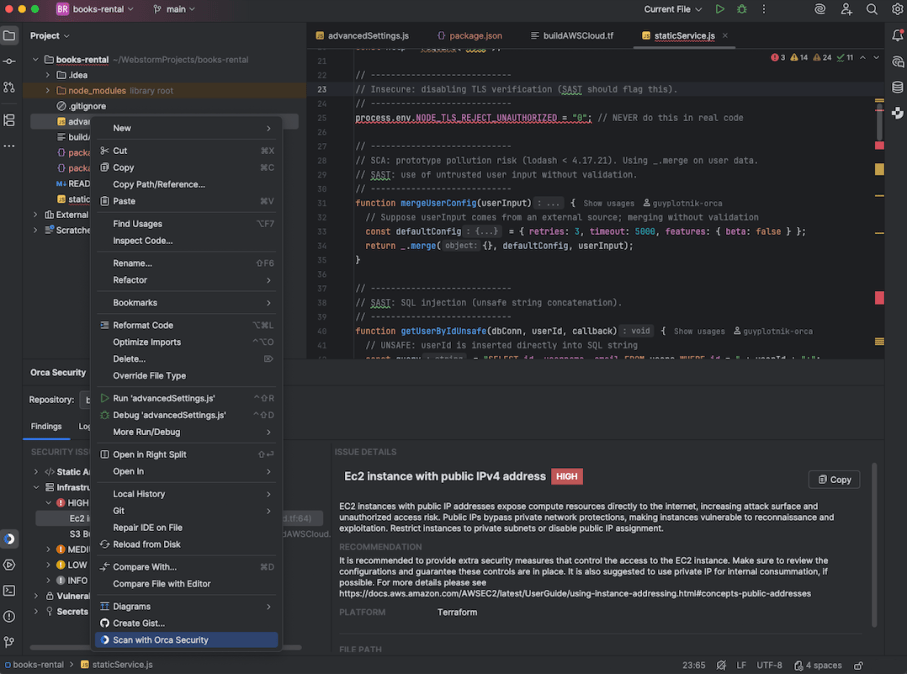
- Actionable, in-context guidance: Each security finding includes detailed explanations and clear remediation steps next to the affected line of code. Developers gain immediate clarity on what’s wrong, why it matters, and how to fix it—no back-and-forth with separate tools required.
What does the extension offer?
Orca’s IntelliJ Extension brings advanced AppSec capabilities to the coding phase, enabling developers to write secure, high-quality code from the start. The extension combines multiple forms of analysis into one unified experience, including:
Comprehensive scanning across multiple risk types
Orca continuously analyzes code and configurations to surface risks early, with support for:
- Secret Detection (with active verification)
- Static Application Security Testing (SAST) for first-party code
- Software Composition Analysis (SCA) for third-party code
- Infrastructure-as-Code (IaC) scanning for vulnerabilities and misconfigurations
Developers can choose to scan their entire workspace, a specific directory, or just the open file, offering flexibility without friction. With instant in-editor feedback, security becomes a natural part of development rather than a separate step.
Built for developer velocity
To fit seamlessly into existing workflows, Orca’s IntelliJ Extension adapts to how developers work:
- Run scans automatically on file save, after branch changes, or on demand.
- Exclude specific files or folders from scans.
- Access relevant insights directly in the IDE without external dashboards.
This flexibility helps teams maintain development speed while strengthening code security.
Clear, contextual findings for every issue
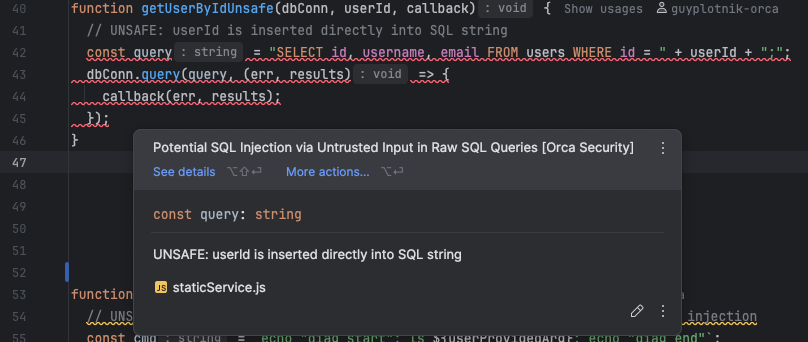
When an issue is detected, it appears inline within the editor, where developers can see detailed explanations, risk context, and AI-driven code fixes. Findings are categorized by scan type and severity, making it easy to prioritize and remediate issues efficiently.
Strengthening the DevSecOps pipeline
By integrating with IntelliJ IDEs, Orca helps organizations introduce security at the earliest phase of development, enabling teams to reduce vulnerabilities, accelerate release cycles, and improve collaboration across the software lifecycle.
About the Orca Cloud Security Platform
Orca offers a unified and comprehensive cloud security platform that identifies, prioritizes, and remediates security risks and compliance issues across AWS, Azure, Google Cloud, Oracle Cloud, Alibaba Cloud, and Kubernetes. The Orca Cloud Security Platform leverages Orca’s patented SideScanning™ technology to provide complete coverage and comprehensive risk detection.
Learn More
Interested in discovering the benefits of the Orca Platform and its Application Security capabilities? Schedule a personalized 1:1 demo.