

In Part 1, we explored how the Orca MCP (Model Context Protocol) Server bridges the gap between AI and your security data, allowing analysts to perform deep security investigations using simple conversational prompts.
But for security to truly scale, it needs to move upstream to where the code is written.
In this blog, we explore how the Orca MCP server helps you truly “Shift Left” by integrating directly into the developer’s IDE. We’ll show how to replace friction with automation, simplifying the security fix process.
The Friction Problem
The biggest challenge in “shifting left” has always been workflow context. Traditionally, asking developers to address security issues meant they had to leave their IDE, log into a separate security tool, learn its interface, and mentally translate abstract alerts into concrete code changes.
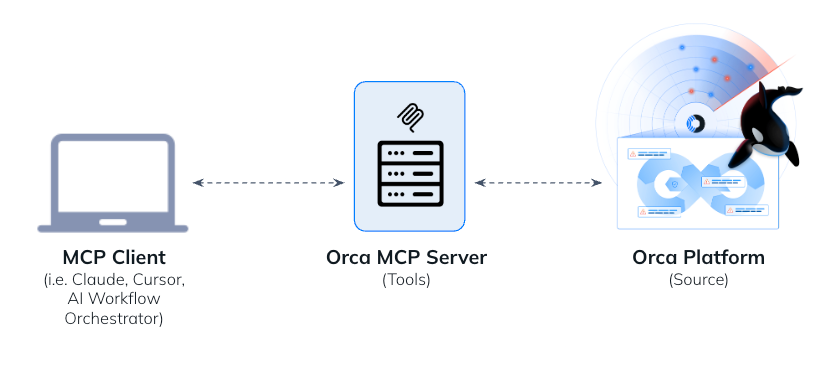
The Orca MCP server flips this model when integrated into an AI-powered IDE like Cursor or VS Code. Instead of forcing the developer to go to the security tool, MCP brings the security expert to the developer, speaking their native language: code.
Scenario A: The “One-Prompt” Ticket Fix
Imagine a developer starts their day with two new security tickets in Jira or Linear.
- The Old Way: Read the ticket, find the files, research the fix, write the code, and test.
Estimated Time: ~1 hour. - The Orca MCP Way: The developer issues a single prompt in their IDE:
I'm currently working on Linear tickets JUN-21 and JUN-22. Investigate the alerts using Orca MCP, prep the code files for my review.What happens?
- Context Gathering: The agent uses the
get_issuetool to read the ticket details directly from Linear. It then callsget_alertvia Orca MCP to pull rich details, identifying, for example, an S3 logging issue (orca-1636403) and a container vulnerability (orca-3194767). - Code Analysis: It examines the local files such as
private-sales.tfandDockerfileto understand the current state. - Generation & Explanation: It generates the fix, adding the missing logging block to the Terraform file and updating the Nginx base image in the Dockerfile.
- Review: The developer sees a clean
diffin their IDE, reviews it, and approves.
Result: The entire triage process drops from an hour to a few minutes. The AI handles the context-switching, letting the developer focus on the solution.
Scenario B: Hardening Infrastructure-as-Code
Consider a scenario where a repository like terragoat (a vulnerable-by-design project) has accumulated high-risk alerts. The developer opens the repo and types:
Find the top 5 critical/high issues Orca is reporting for this repo and fix them.What happens?
- Targeted Discovery: The agent uses
discovery_searchto query Orca for open “critical” and “high” severity alerts specifically tied to this repository. - Prioritization: It identifies the most impactful issues, such as a Google Storage Bucket lacking uniform access, public BigQuery datasets, or hardcoded JWT tokens.
- Systematic Remediation: It reads the relevant files (e.g.,
gcp.tf,storage.tf,my_script.py) and generates precise code modifications to fix the misconfigurations. - Verification: It summarizes the security improvements (e.g., “Fixed: Hard-coded JWT token exposed in source code”) and verifies syntax validity.
This transforms a daunting backlog reduction task into a single, automated action. The AI acts as a security-focused pair programmer, instantly identifying priorities from existing scan data and performing the tedious work of remediation.
By bridging the gap between the Orca Platform and the IDE, we stop treating security as a “gate” and start treating it as a feature of the development environment.
In Part 3, we will move from the developer’s laptop to the SOC, demonstrating how to build Autonomous Agents and Workflows that handle investigations and reporting on their own.
About the Orca MCP Server
Model Context Protocol (MCP) is an open standard introduced by Anthropic that allows AI assistants to connect and interact with other data sources. This innovation extends the relevance of GenAI to the data sources that matter most to operating your business.
The Orca MCP Server enables security teams to securely connect data from their Orca environment with Claude and other AI chatbots, making cloud security insights instantly accessible through natural language queries. This integration provides a growing set of MCP tools that security professionals can use to perform actions or calculations tapping into Orca’s intelligence without navigating complex interfaces or learning intricate query languages.
Learn more about Orca
The Orca MCP Server is available to all customers. To get set up, check out this documentation.
If you’re not yet a customer of Orca, but would like to explore how the Orca Platform can support your cloud security journey, sign up for a demo.