



Table of contents
Quick Overview
CVE-ID: CVE-2026-21509
CVSS Score: 7.8 (High)
Affected Products: Microsoft Office 2016, 2019, LTSC 2021, LTSC 2024, Microsoft 365 Apps
Attack Vector: Malicious Office document (user must open file)
Active Exploitation: Confirmed active exploitation in the wild
PoC Available: No
CISA KEV: Yes—Remediation deadline February 16, 2026
Fix: Emergency out-of-band patches available for all affected versions
Key Terms Explained
Before diving in, here’s a quick reference for the technical terminology used in this briefing.
OLE (Object Linking and Embedding)
A Windows technology that allows documents to embed or link to external objects – such as spreadsheets, media files, or interactive controls. When you paste an Excel chart into a Word document and it stays “live,” that’s OLE at work. Attackers have abused OLE for years to embed malicious content inside seemingly harmless Office files.
COM (Component Object Model)
Windows building blocks that programs can call to perform specific functions. Think of them as reusable software components. Office uses COM objects to embed content, play media, or display web pages inside documents. Each COM object has a unique identifier (CLSID).
CLSID (Class Identifier)
A unique ID (formatted as a GUID like {EAB22AC3-30C1-11CF-A7EB-0000C05BAE0B}) that identifies a specific COM object. When Office sees a CLSID in a document, it knows exactly which component to load.
Kill Bit
A registry-based mechanism that blocks specific COM objects from loading. When a COM object is deemed dangerous, administrators can set a “kill bit” to prevent it from ever being instantiated – essentially a blocklist for dangerous components.
KEV (Known Exploited Vulnerabilities)
CISA’s catalog of vulnerabilities confirmed to be actively exploited in the wild. Inclusion in KEV signals high priority and, for US federal agencies, triggers mandatory remediation deadlines.
What Happened
A high-severity vulnerability (CVE-2026-21509, CVSS 7.8) was disclosed affecting Microsoft Office, allowing attackers to bypass OLE security mitigations and execute malicious code via specially crafted documents. Due to confirmed active exploitation and the massive installed base of Office products, immediate patching is required.
Microsoft released emergency out-of-band patches on January 26, 2026 – outside the normal Patch Tuesday cycle – signaling the severity of this issue. CISA immediately added it to the Known Exploited Vulnerabilities (KEV) catalog, setting a February 16, 2026 remediation deadline for federal agencies.
Technical Deep Dive
The vulnerability stems from how Microsoft Office validates inputs when making security decisions (classified as CWE-807: Reliance on Untrusted Inputs in a Security Decision).
How it works
Microsoft Office maintains a protection mechanism that blocks known-dangerous COM objects from loading inside documents. This is done through “Compatibility Flags” that act as kill bits. CVE-2026-21509 allows attackers to craft a document that bypasses this validation, causing Office to load a COM object that should have been blocked.
The targeted COM object
The attack specifically targets Shell.Explorer.1, identified by CLSID {EAB22AC3-30C1-11CF-A7EB-0000C05BAE0B}. This is essentially an embedded Internet Explorer browser control. When loaded inside an Office document, this control can load local files, execute scripts, and connect to remote servers – giving attackers a foothold to download and execute arbitrary payloads.
The attack flow
- Attacker sends a malicious Office document (Word, Excel, PowerPoint) to the target
- Target opens the document (Preview Pane is NOT an attack vector)
- Office processes the embedded OLE object and attempts to load Shell.Explorer.1
- Due to the vulnerability, the kill bit check is bypassed
- The embedded browser control executes, connecting to attacker infrastructure
- Attacker achieves code execution without any macro warning or “Enable Content” prompt
Key attack characteristics
- Attack Vector: Local (requires document delivery to target)
- Attack Complexity: Low (no special conditions needed)
- Privileges Required: None
- User Interaction: Required (victim must open malicious document)
- Impact: High across confidentiality, integrity, and availability
Affected Products
The vulnerability affects the entire Microsoft Office ecosystem:
- Microsoft Office 2016 (32-bit and 64-bit, MSI-based)
- Microsoft Office 2019 (32-bit and 64-bit, Volume License and Click-to-Run)
- Microsoft Office LTSC 2021 (32-bit and 64-bit)
- Microsoft Office LTSC 2024 (32-bit and 64-bit) Microsoft 365 Apps for Enterprise (32-bit and 64-bit)
Note: Office 2016 and Office 2019 reached end-of-support on October 14, 2025. Microsoft released patches for these versions at their discretion. Organizations still running these versions should factor lifecycle status into their risk assessment and migration planning.
Exploitation Status
Active exploitation has been confirmed by Microsoft prior to public disclosure, making this a true zero-day. The attacks appear targeted rather than widespread, suggesting sophisticated threat actors with specific objectives.
No public proof-of-concept is currently available, which likely means exploitation is limited to a small number of threat actors. However, this window typically closes within days to weeks as researchers reverse-engineer the patch.
The vulnerability was discovered internally by Microsoft’s security teams. No specific threat actor attribution has been published.
Remediation Guidance
Patches are now available for all affected Office versions. Apply immediately.
Office 2021 / LTSC 2024 / Microsoft 365 Apps: Automatically protected via a service-side change. Restart all Office applications (Word, Excel, Outlook, PowerPoint) to apply the fix. No manual download required.
Office 2016 (MSI installations): Install KB5002713 via Microsoft Update, WSUS, or the Microsoft Download Center.
Office 2019: Update to Version 1808 (Build 10417.20095) via the standard update mechanism.
Temporary Mitigation (if patching is delayed):
- Apply a registry-based kill bit to block the vulnerable COM object. This prevents Shell.Explorer.1 from loading inside Office documents.
- The mitigation involves creating a registry subkey named {EAB22AC3-30C1-11CF-A7EB-0000C05BAE0B} under the appropriate COM Compatibility path and setting a DWORD value “Compatibility Flags” to 400.
Important: The exact registry path varies depending on your Office installation type:
- 32-bit vs 64-bit Office
- MSI vs Click-to-Run installation
- 32-bit Office on 64-bit Windows (WOW6432Node path)
Refer to Microsoft’s official advisory for the complete list of registry paths.
Back up the registry before making changes. Restart Office applications after applying the mitigation.
Defense-in-Depth Recommendations
Beyond patching, consider these additional protective measures:
- Protected View: Ensure this default setting remains enabled. It opens documents from external sources in a sandboxed read-only mode, blocking active content until the user explicitly clicks “Enable Editing.”
- Attack Surface Reduction (ASR) Rules: Configure rules to block Office applications from creating executable content or spawning child processes.
- Email Gateway Filtering: Quarantine or block suspicious Office attachments, especially those with embedded OLE objects from external sources.
- Microsoft Defender: Microsoft has confirmed built-in detections are in place to block exploitation attempts.
- User Awareness: Reinforce caution with unexpected document attachments. The attack requires user interaction – a well-trained workforce is a critical defense layer.
Detection indicators to monitor
- Unusual COM object instantiation by Office processes
- Office applications spawning unexpected child processes
- Network connections initiated by WINWORD.EXE, EXCEL.EXE, or POWERPNT.EXE to unknown external hosts
- Registry modifications to COM Compatibility keys
Business Impact
Successful exploitation allows attackers to achieve code execution within the user’s session context. From there, they can establish persistence, move laterally, and escalate privileges. Potential outcomes include data theft, operational disruption, ransomware deployment, and espionage.
Organizations at heightened risk:
- Government agencies (mandated CISA deadline applies)
- Financial services (heavy document workflows, regulatory exposure)
- Healthcare (document-centric operations, sensitive patient data)
- Legal sector (privileged communications, sensitive case files)
Any organization that processes Office documents from external sources (partners, customers, vendors)
The lack of public PoC provides temporary relief, but organizations should treat the CISA February 16 deadline as the maximum acceptable remediation window.
Timeline
January 26, 2026: Microsoft releases emergency out-of-band patches, confirms active exploitation
January 26, 2026: CISA adds CVE-2026-21509 to Known Exploited Vulnerabilities catalog
February 16, 2026: CISA remediation deadline for US federal agencies
How Can Orca Help?
The Orca Cloud Security Platform provides the context needed to prioritize remediation:
- Surface all cloud workloads running vulnerable Office versions
- See which systems are internet-exposed or host sensitive data
- View attack paths showing how this CVE could chain with other risks to reach critical assets
- Focus on choke points that break multiple attack paths at once
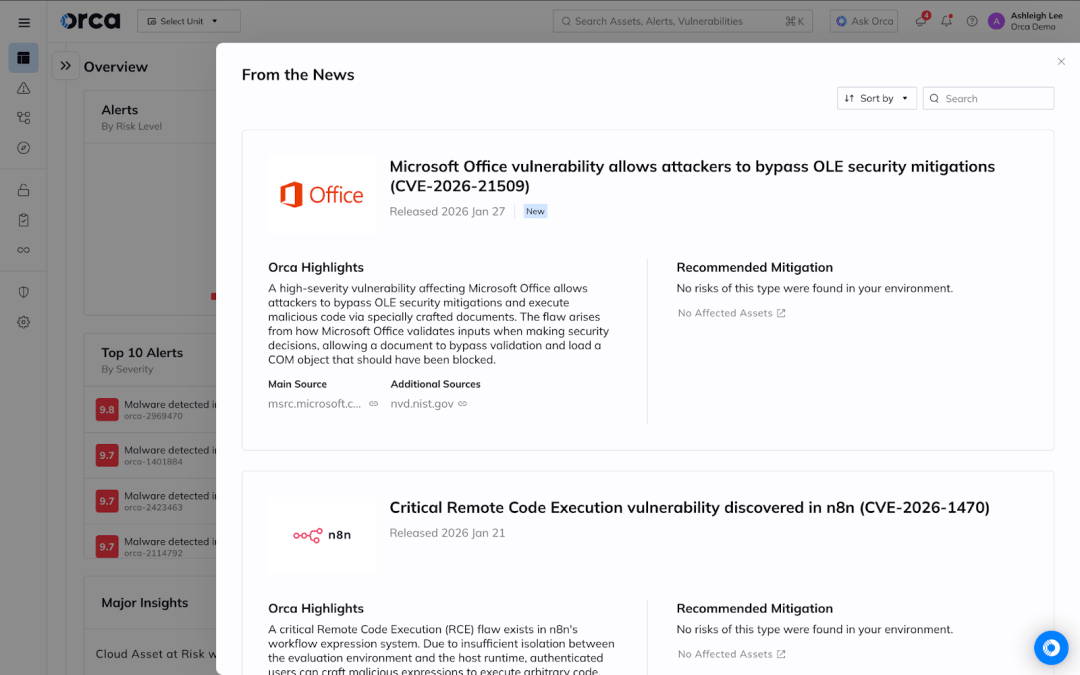
Orca’s “From the News” widget displays CVE-2026-21509 directly in the dashboard. Click the news item to instantly see all affected assets in your environment.





 Chat with an Orca Expert